5 Forms & validation – Part 1: fundamentals
This chapter covers
- Creating forms using the EditForm component
- Capturing user input with built-in Blazor components
- Validating forms
This is the first of two chapters covering forms and validation in Blazor. In this first chapter, we’re going to be building a basic form which will allow us to add new trails into the app. In the next chapter we’ll add to our work, introducing more advanced features. Over the course of these chapters, we’ll learn about all the great built-in components Blazor gives us, as well as the many extension points we can use to customize the various elements of our forms.
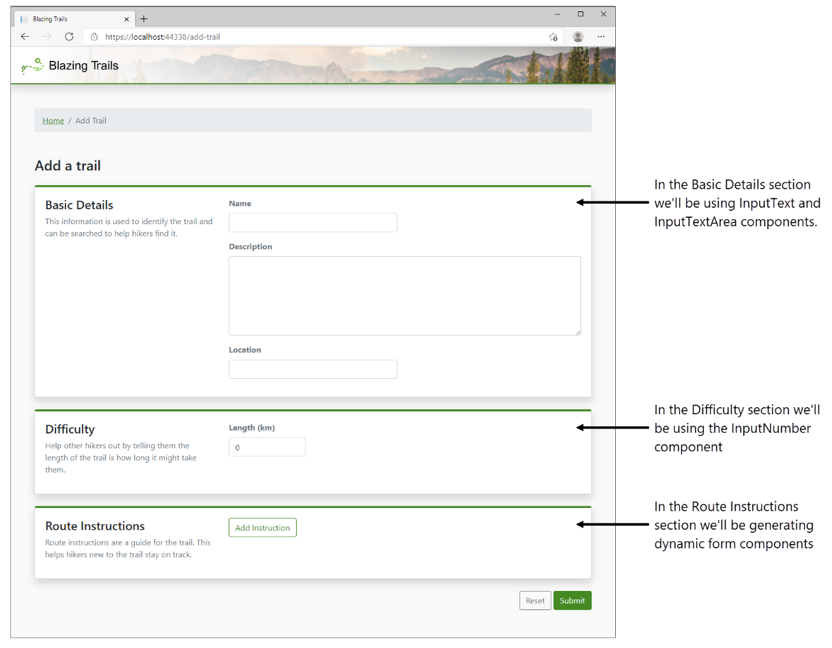
By the end of this chapter, we’ll have built our first form with Blazor (see figure 5.1). In order to do this, we’ll need to validate the data collected using a library called Fluent Validation (https://fluentvalidation.net/) and persist it to a new API.
NOTE
If you're following along building the example application, you will need to complete appendix A before starting this chapter.
Figure 5.1 The finished add trail form we will be building throughout this chapter.
With the ability to create trails via a form, we'll need to make some changes to the architecture of the application. Specifically, we’ll be introducing an API into the solution along with a shared class library. The updated architecture of the application is shown in figure 5.2.