appendix
appendix. OpenAI API Key
- Create an OpenAI account. Visit https://platform.openai.com, and click Sign up. You can register using your email address or sign in with a Google or Microsoft account. After signing up, you’ll need to verify your email address.
- Add a payment method. Navigate to the billing section by clicking your profile icon and selecting Billing. Click Add Payment Method to register a credit or debit card. OpenAI requires a payment method on file even if you plan to use free credits.
- Check credits and add funds. New accounts previously received $5–$18 in free credits, but this policy has changed. Check your current balance in the Billing section. If you have no credits, click Add to Credit Balance and add at least $5 to get started. The minimum charge is $5, and credits expire after one year.
- Generate your API key. Go to the API Keys section (https://platform.openai.com/api-keys), and click Create New Secret Key.” Give your key a descriptive name like agent-development, and click Create Secret Key.
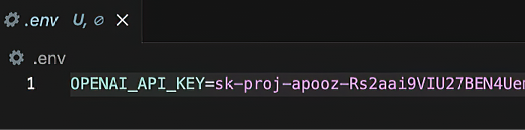
WARNING Copy the key immediately; you won’t be able to see it again. If you lose it, you’ll have to create a new one. The key shouldn’t be hardcoded into your application. Instead, store it securely in an .env file, and use the python-dotenv library to load it as an environment variable (figure A.1).
Figure A.1 Example of storing the OpenAI API key in a .env file