16 Advancing to RAG, Web UI, and fine-tuning
This chapter covers
- Retrieval-augmented generation
- Open WebUI: a free, ChatGPT-like interface
- Custom Modelfiles, for baking personality and parameters into named models
- LangChain integration
- Agentic AI patterns, including OpenClaw and PicoClaw
- Fine-tuning with Unsloth
Your chatbot is running. It handles conversations, streams responses, and supports customizable system prompts. That is a solid foundation, but it is also a starting point. The techniques in this chapter will show you what is possible when you build on that foundation.
16.1 RAG: Retrieval-augmented generation
Your chatbot is smart, but it only knows what was in its training data. It cannot answer questions about your personal documents, your company’s internal knowledge base, or anything that happened after the model was trained. RAG changes that.
16.1.1 What is RAG?
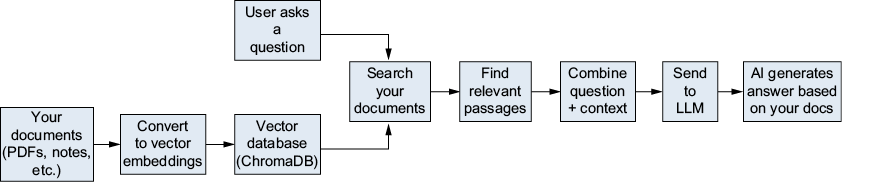
The idea is simple. Before asking the AI to generate an answer, you first retrieve relevant information from your own documents. Then you give that information to the AI as context, along with the user’s question (see figure 16.1). The AI generates an answer based on both its general knowledge and the specific documents you provided.
Figure 16.1 The RAG pipeline: a user query is matched against a document database, relevant chunks are retrieved, and the LLM generates an answer using those chunks as context.