appendix A Building a LoRaWAN network
The home digital twin used throughout this book is built on LoRaWAN sensors. Although technologies such as Zigbee and platforms like Home Assistant are excellent choices for home automation, I selected LoRaWAN because the same architecture and design patterns scale naturally beyond the home to industrial, agricultural, and city-scale digital twins. This appendix focuses on building a private LoRaWAN network that mirrors how real-world digital twin deployments are designed and operated.
A.1 What you’ll need
Figure A.1 shows the architecture of the LoRaWAN-based sensing solution we’ll build in this appendix. It illustrates how sensor data flows from LoRaWAN devices through a gateway and network server into managed cloud services that can scale from a handful of sensors to hundreds of devices.
Figure A.1 LoRaWAN network architecture using a managed network server within AWS
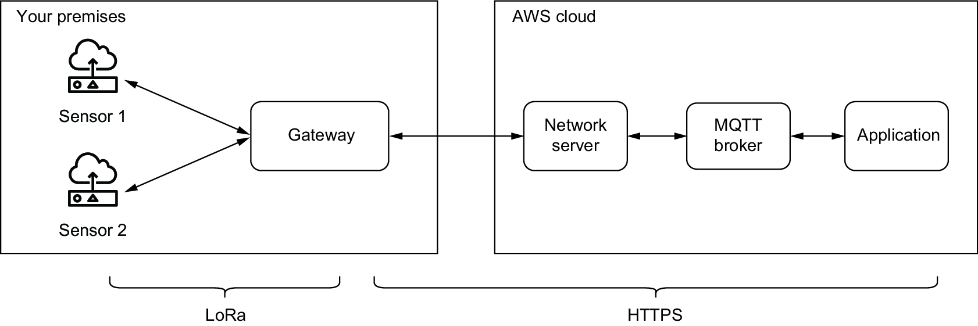
You can quickly set up your own LoRaWAN network by acquiring a gateway, network server, and sensors. This will give you a robust foundation that can scale from a handful of sensors to hundreds of devices across your deployment area.
A.1.1 LoRaWAN gateway
A gateway bridges your sensors and the internet, receiving LoRa radio signals and forwarding data to a network server via HTTPS. If you live within the coverage of The Things Network (TTN), you may be able to use a community gateway. Otherwise, you’ll need your own LoRaWAN gateway.