This chapter covers:
- Changing values in existing DSL content
- Introducing edit state in React component functions to implement editability
- Using the MobX framework to keep the projection’s implementation clean and tidy
In chapter 4, we implemented a projection that visualizes an AST as notated DSL content. That AST isn’t going to produce itself, though: we’ll have to extend the Domain IDE so that domain experts can create and change ASTs. To that end, we’re going to turn the projection from chapter 4 into a true editor over the course of this chapter. We’re going to look at how the projection’s current implementation projects each piece of data in the AST, and decide how to make that editable piece-by-piece.
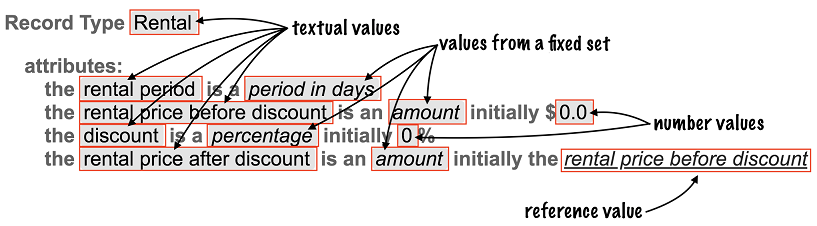
In chapter 6, we’re going to learn how to add and delete whole AST objects. In the current chapter, we’ll first figure out how to make the individual values of properties' settings in the AST editable. There are a couple of different kinds of such property values:
- Free-format textual values (as in: strings), such as the names of record types, or their attributes.
- Number values, such as the initial value of an attribute.
- Values from a fixed set, such as the type of an attribute.
- Reference values, such as which attribute is referenced from a “Attribute Reference” AST object.
Figure 5.1. A catalog of the kinds of property values encountered in a record type.
Let’s see how these values and editing them relates to the AST.