3 Creating web services and applications with ASP.NET Core
This chapter covers
- Creating web services
- Creating web applications
- Linq - Language Integrated Query
The console application from the prior section receives command line parameters and writes the specified string in ASCII art to the console output. The command line parsing library helps with parsing and is fairly easy to execute from a terminal. It is just as easy to create a web service that performs the same function. In this section we’ll port the ASCII art program into a web service using ASP.NET Core.
In the previous section, we used the dotnet new console command to create a console application from a template. There are many other templates available. You can see a list by running dotnet new --list. We will use the empty Web template for the ASCII art service. Use the command shown in Listing 3.1 to create a new folder with the new project.
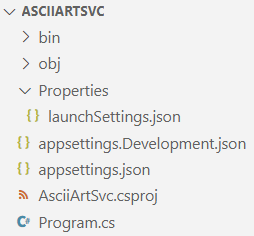
This template will create files similar to the ones shown in Figure 3.1.
Figure 3.1. Files and folders created by the empty web template
There is a Web API template that will look much more like the ASP.NET Core projects you see in the real world. We use the empty template in this example because with the minimal API design of ASP.NET Core, creating a web service is as easy as creating a console application.