This chapter covers:
- Various topic creation parameters
- Log files written as partitions on disk
- How to see the content of those logs
- Topic compaction
In this chapter, we will look further into how we might want to store our data across topics as well as how to create and maintain the life of a topic. This will include how partitions fit into our design considerations as well as how we can view our data on the brokers. All of these specifics will help us also dig into how your topic can start to appear to show data like database tables that update data rather than append!
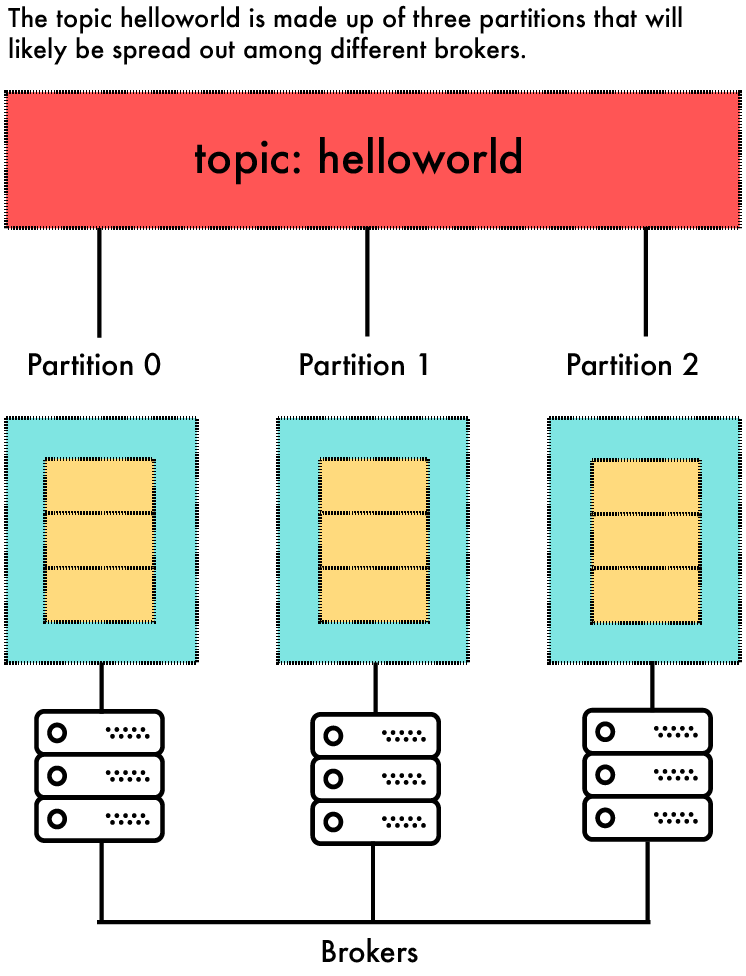
To quickly refresh our memory, it is important to know that a topic itself is more of a logical name rather than one physical instance. It does not usually exist on only one broker. In my experience, most of your consuming applications of your data will think of the data being related to a topic: no other details needed for them to subscribe. However, behind the topic name, one to many partitions actually make up a specific topic. The logs that are written to the broker filesystems that make up a topic are the result of Kafka actually writing the data in the cluster. Figure 7.1 shows a three partition topic that makes up one topic named 'helloworld'. A single partitions copy is not split between brokers and has a physical footprint on each disk. Figure 7.1 also shows how those partitions are made up of messages that are sent to a topic.
Figure 7.1. Example Topic With Partitions