chapter five
5 Introducing AI Agents with LangGraph
This chapter covers
- Overview of LLM agents
- LangGraph fundamentals and state management
- Transition from LangChain chains
- Practical case study conversion
In this chapter, I’ll show you how to move from basic LangChain applications to more advanced agent-based systems using LangGraph. We'll rebuild the web research assistant from chapter 4, shifting it from a simple, linear setup to a flexible agent framework for handling more complex tasks. By the end, you'll have a basic understanding of how to build applications with LangGraph that can manage multi-step tasks and make better decisions.
5.1 Understanding LLM-Based Workflows and Agents
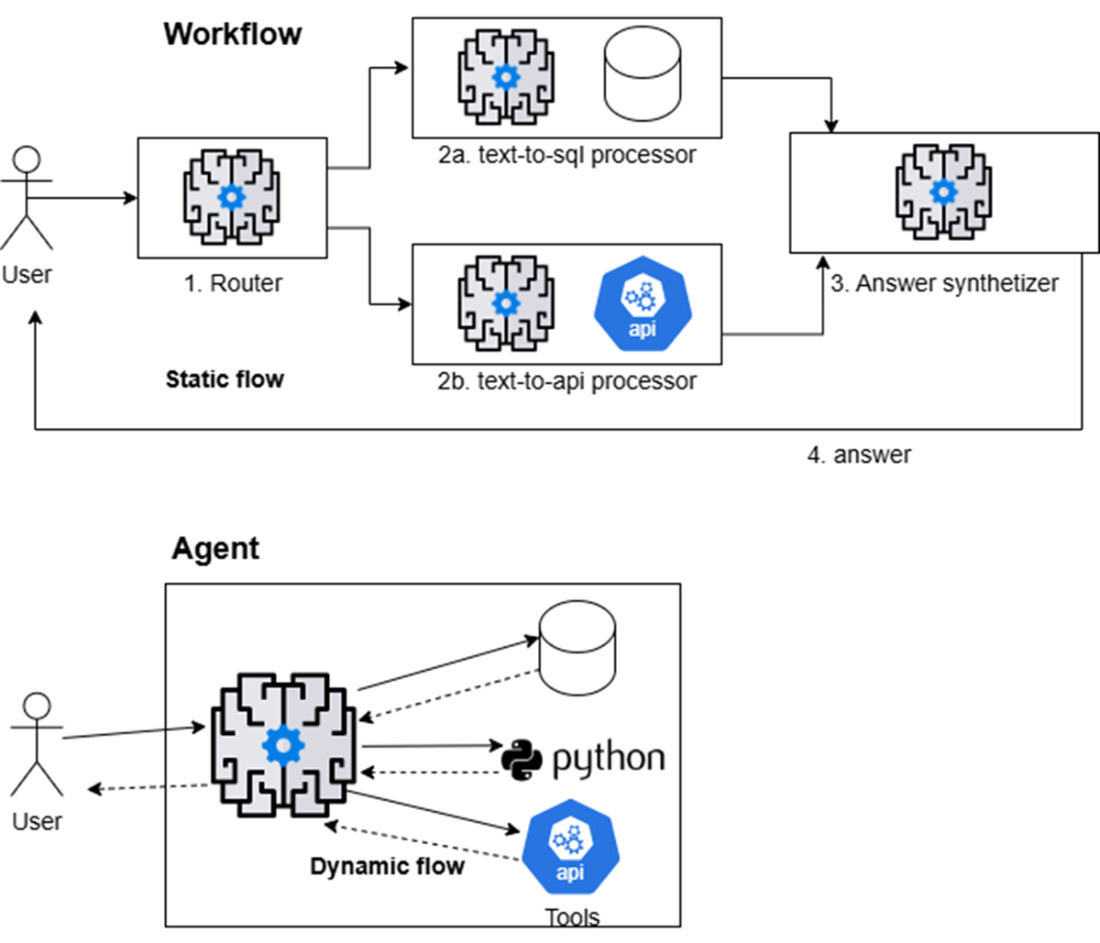
LLM-powered AI agents follow two primary design patterns: workflows and agents. Both determine the application's flow, as shown in figure 5.1. It's crucial to understand these concepts—and what is meant by "agentic system" or "agent-based system"—since the terms are similar yet can be confusing.
Figure 5.1 Workflows and agents: workflows use the LLM to choose the next step from a fixed set of options, such as routing a request to a SQL database or a REST API and synthetizing the answer with the related results. Agents, however, dynamically select and combine tools to achieve their objectives.