2 Creating a virtual machine
Ready to see how quickly you can set up a web server in Azure? In this chapter, we dive straight into one of the most common requests when it comes to VMs: building a basic web server. This workload is a great example of the core Infrastructure as a Service (IaaS) components in Azure.
Let’s assume that you work for a pizza store that wants to expand its operations and accept online orders for pizza delivery or takeout. To build an online presence, you need a website. In the first couple of parts of this book, we explore the different features and services in Azure that let you build and run both IaaS and Platform as A Service (PaaS) web applications. You can start to make informed decisions as to when to build and run a VM to power a website, and when you might use PaaS to do so. But the first step to all this is to build a web server.
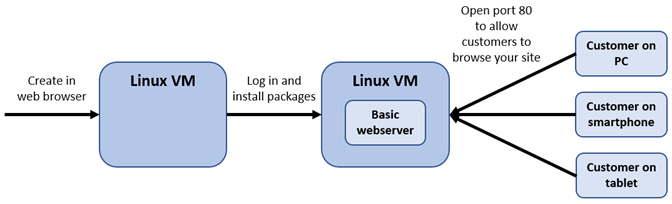
In this chapter, you create an Ubuntu Linux VM and install a basic web server. Don’t worry about using Linux—you create a Windows VM in the end-of-chapter lab exercise! Ubuntu is a common web server platform, and it’s a great way to learn about SSH public-key authentication. You’ll then see how to open a network port for customers to access your website on the internet. A high-level overview of this basic environment is shown in figure 2.1.
Figure 2.1 In this chapter, you create a basic VM, log in to install a web server, and then open a network port to allow customers to browse to the sample website.