2 Data frames
The main data structure that people use, and want to use, in pandas is the data frame. Data frames are two-dimensional tables that look and work similar to an Excel spreadsheet. The rows are accessible via an index—yes, the same index that we have been using so far with our series! So long as you use .loc and .iloc to retrieve elements via the index, you’ll be fine.
But of course, data frames also have columns, each of which has a name. Each column is effectively its own series, which means that it has an independent dtype from other columns.
Figure 2.1. A simple data frame with five rows ('row0' through 'row4') and five columns ('col0' through 'col4')
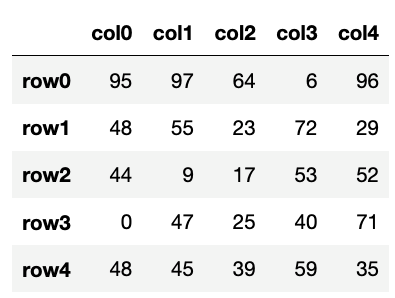
In a typical data frame, each column represents a feature, or attribute, of our data, while each row represents one sample. So in a data frame describing company employees, there would be one row per employee, and there would be columns for first name, last name, ID number, e-mail address, and salary.
In this chapter, we’ll practice working with data frames in a variety of settings. We’ll practice creating, modifying, selecting from, and updating data frames. We’ll also see how just about every series method will also work on a data frame, returning one value per data frame column.