13 Project: Task Manager
This chapter covers
- Creating the necessary scaffolding for a task manager
- Implementing a simple list of tasks
- Adding advanced features to the task manager
Welcome to the third and final project for this first half of the book. You will now have to wield all the magic and spells that you have learned this far as well as some extra knowledge about JavaScript and HTML that you have hopefully picked up elsewhere - however that's only required for the very advanced homework at the end of this chapter.
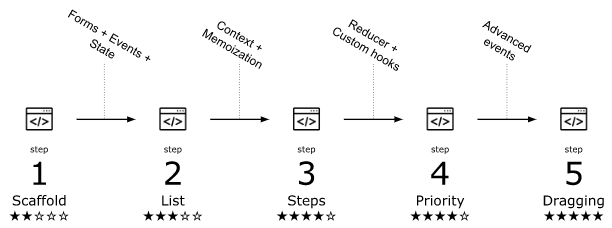
In this project, we're building a task manager. By that term, we mean a slightly more complex variant of a todo-list. The task manager at first consists of a simple todo-list implemented as cards that can be started and completed. We then add in sub-steps to each task, so the user can add some finer details to their tasks at hand. We're then adding in the option of changing the order of the steps in each task, first only using buttons, but secondly also using drag and drop. It is that last bit, the drag 'n drop part, that's going to be quite tricky to complete. You can see this development in figure 13.1, where we are going to use advanced events to get to the final step 5.
Figure 13.1 As you implement the task manager, you will go through these five steps in order to add more and more functionality and complexity to the application.