chapter eight
8 Dynamic linking: the implementation
This chapter covers:
- Using dynamic linking in a single-page application
- Creating multiple instances of Emscripten’s JavaScript Module object with each instance dynamically linked to a different WebAssembly side module
- Reducing the size of the WebAssembly main module by enabling dead code elimination
In chapter 7 you learned about the different approaches that are available for dynamic linking of WebAssembly modules:
- dlopen where your C or C++ code manually links to a module obtaining function pointers to the specific functions as they’re required
- dynamicLibraries where your JavaScript provides Emscripten with a list of modules to link to and Emscripten automatically links to those modules during its initialization
- Manually linking where your JavaScript takes the exports of one module and passes them as the imports to another module using the WebAssembly JavaScript API.
In this chapter, you’re going to use the dynamicLibraries approach where Emscripten handles the dynamic linking for you based on a list of modules that you specify.
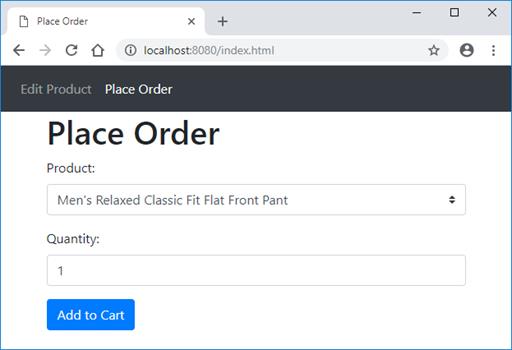
Suppose the company who created the online version of their Point of Sale application’s Product Entry page now wants to create the Place Order form shown in figure 8.1.
Figure 8.1 The new Place Order form