concept protection in category active directory

This is an excerpt from Manning's book Learn Active Directory Management in a Month of Lunches.
The protection must be removed before the deletion can occur. There’s a checkbox in the Account section of the user properties in ADAC and on the Object tab in ADUC—uncheck the box to remove the protection.
Several years ago I got a call from my boss. One of our customers had deleted an OU full of user accounts (several hundred) and wanted to know if there was anything we could do to get the data back quickly. They were running an older version on Active Directory, so the short answer was no—they had to perform an authoritative restore (see section 13.2). If they’d been on Windows Server 2008 or later, they could have benefited from using protection from accidental deletion.
You’ve seen protection from accidental deletion in action a number of times during the early chapters of the book, when creating, moving, and deleting objects, such as user accounts or groups. As a quick refresher, protection from accidental deletion isn’t a property of an AD object. It’s a security setting that denies the ability to delete to the Everyone group. Everyone is a group that Active Directory automatically creates and maintains. It contains all users, authenticated and unauthenticated, including administrators.
The Protect from Accidental Deletion setting for an AD object can be viewed from the Properties tab. Navigate to the object in ADAC and right-click it. Choose Properties to see the dialog presented in figure 13.1, which shows the ADMLUsers OU. A similar setting is available on all objects, such as users, groups, and computers. You can turn this protection on when you create the object, which is the best way of remembering to do it! One advantage of automating object creation is that setting protection from accidental deletion never gets forgotten.
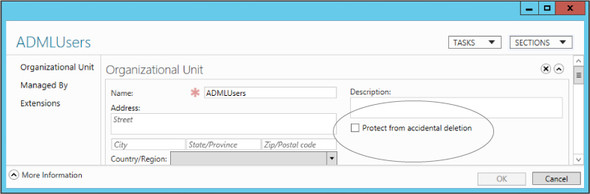
You learned how to add and remove protection from accidental deletion in the earlier chapters on managing user, groups, and computer accounts. Review those chapters if you need to refresh your memory; otherwise, pick an OU and practice adding and removing the protection. Be sure to observe the messages you get when trying to delete a protected object.