concept dispatcher in category akka

This is an excerpt from Manning's book Akka in Action.
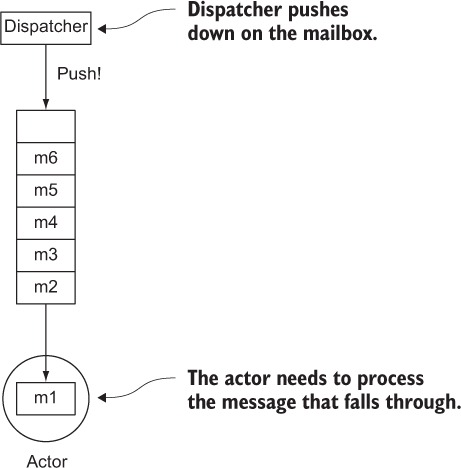
Actors are invoked at some point by a dispatcher. The dispatcher pushes the messages in the mailbox through the actors, so to speak. This is shown in figure 1.22.
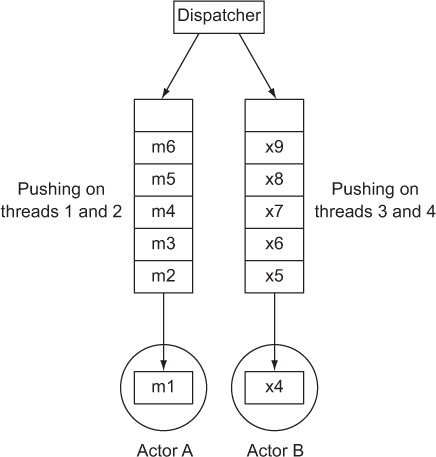
The type of dispatcher determines which threading model is used to push the messages through. Many actors can get messages pushed through on several threads, as shown in figure 1.23.
Figure 1.23 shows that messages m1 through m6 are going to be pushed through by the dispatcher on threads 1 and 2, and x4 through x9 on threads 3 and 4. This figure shouldn’t make you think that you can or should control exactly which message will be pushed through on which thread. What’s important here is that you can configure the threading model to quite some extent. All kinds of dispatchers can be configured in some way, and you can allocate a dispatcher to an actor, a specific group of actors, or to all actors in the system.
So when you send a message to an actor, all you’re really doing is leaving a message behind in its mailbox. Eventually a dispatcher will push it through the actor. The actor, in turn, can leave a message behind for the next actor, which will be pushed through at some point.
Actors are lightweight because they run on top of dispatchers; the actors aren’t necessarily directly proportional to the number of threads. Akka actors take a lot less space than threads: around 2.7 million actors can fit in 1 GB of memory. That’s a big difference compared to 4096 threads for 1 GB of memory, which means that you can create different types of actors more freely than you would when using threads directly.
There are different types of dispatchers to choose from that can be tuned to specific needs. Being able to configure and tune the dispatchers and the mailboxes that are used throughout the application gives a lot of flexibility when performance tuning. We give a couple of simple tips on performance tuning in chapter 15.
When we want to use another mailbox, we can configure this in the application.conf file. There are multiple ways to use the mailbox. The type of the mailbox is bound to the dispatcher used, so we can create a new dispatcher type and use our mailbox. This is done by setting the mailbox-type in the application.conf configuration file, and we use the dispatcher when creating a new actor. One way is shown in the following snippet:
my-dispatcher { mailbox-type = aia.performance.monitor.MonitorMailboxType #1 } val a = system.actorOf( Props[MyActor].withDispatcher("my-dispatcher") #2 ) #1 - Sets mailbox type of dispatcher in application.conf file #2 - Creates an actor using our dispatcher configuration !@%STYLE%@! {"css":"{\"css\": \"font-weight: bold;\"}","target":"[]"} !@%STYLE%@!We mentioned before that there are other ways to get Akka to use our mailbox. The mailbox is still bound to the chosen dispatcher, but we can also overrule which mailbox the default dispatcher should use, with the result that we don’t have to change the creation of our actors. To change the mailbox used by the default dispatcher, we can add the following lines in the configuration file:
In chapter 1 we mentioned that the dispatcher of an actor is responsible for assigning threads to the actor when there’s a message waiting in the mailbox. Until now you didn’t need to know about the details of the dispatcher (although we changed the behavior earlier in chapter 9 with the routers). Most of the time, the dispatcher instance is shared between multiple actors. It’s possible to change the configuration of the default dispatcher or create a new dispatcher with a different configuration. In this section we’ll start by figuring out how to recognize a thread pool problem. Next, we’ll create a new dispatcher for a group of actors. And after that we’ll show how you can change the thread pool size and how to use a dynamically sized thread pool by using another executor.
The behavior of the dispatcher can be changed by changing its configuration or dispatcher type. Akka has four built-in types, as shown in table 16.2.
Table 16.2. Available built-in dispatchers
Type
Description
Use case
Dispatcher This is the default dispatcher, which binds its actors to a thread pool. The executor can be configured, but uses the fork-join-executor as default. This means that it has a fixed thread pool size. Most of the time, you’ll use this dispatcher. In almost all our previous examples, we used this dispatcher. PinnedDispatcher This dispatcher binds an actor to a single and unique thread. This means that the thread isn’t shared between actors. This dispatcher can be used when an actor has a high utilization and has a high priority to process messages, so it always needs a thread and can’t wait to get a new thread. But you’ll see that usually better solutions are available. BalancingDispatcher This dispatcher redistributes the messages from busy actors to idle actors. We used this dispatcher in the router load-balancing example in section 9.1.1. CallingThreadDispatcher This dispatcher uses the current thread to process the messages of an actor. This is only used for testing. Every time you use TestActorRef to create an actor in your unit test, this dispatcher is used. When we look at our receiver actor with 100 workers, we could use the Pinned-Dispatcher for our receiver. This way it doesn’t share the thread with the workers. And when we do, it solves the problem of the receiver being the bottleneck. Most of the time a PinnedDispatcher isn’t a solid solution. We used thread pools in the first place to reduce the number of threads and use them more efficiently. In our example the thread will be idle 33% of the time if we use a PinnedDispatcher. But the idea of not letting the receiver compete with the workers is a possible solution. To achieve this, we give the workers their own thread pool by using a new instance of the dispatcher. This way we get two dispatchers, each with its own thread pool.
We’ll start by defining the dispatcher in our configuration, and using this dispatcher for our workers.