concept receiver in category akka

This is an excerpt from Manning's book Akka in Action.
Listing 3.9. SendingActor implementation
object SendingActor { def props(receiver: ActorRef) = Props(new SendingActor(receiver)) #1 case class Event(id: Long) case class SortEvents(unsorted: Vector[Event]) #2 case class SortedEvents(sorted: Vector[Event]) #3 } class SendingActor(receiver: ActorRef) extends Actor { import SendingActor._ def receive = { case SortEvents(unsorted) => receiver ! SortedEvents(unsorted.sortBy(_.id)) #1 - receiver is passed through the Props to the constructor of the SendingActor; in the test we pass in a testActor. #2 - The SortedEvent message is sent to the SendingActor. Uses an immutable Vector. #3 - The SortedEvent message is sent to the receiver after the SendingActor has sorted it. Uses an immutable Vector. !@%STYLE%@! {"css":"{\"css\": \"font-weight: bold;\"}","target":"[]"} !@%STYLE%@!
A SortEvents message is sent to the SendingActor. The SortEvents message contains events that must be sorted. The SendingActor should sort the events and send a SortedEvents message to a receiver actor. In the test we pass in the testActor instead of a real actor that would process the sorted events, which is easily done, since the receiver is just an ActorRef. Since the SortEvents message contains a random vector of events, we can’t use an expectMsg(msg); we can’t formulate an exact match for it. In this case we use expectMsgPF, which takes a partial function just like the receive of the actor. Here we match the message that was sent to the testActor, which should be a SortedEvents message containing a sorted vector of Events. If we run the test now, it will fail because we haven’t implemented the message protocol in SendingActor. Let’s do that now.
Listing 3.9. SendingActor implementation
object SendingActor { def props(receiver: ActorRef) = Props(new SendingActor(receiver)) #1 case class Event(id: Long) case class SortEvents(unsorted: Vector[Event]) #2 case class SortedEvents(sorted: Vector[Event]) #3 } class SendingActor(receiver: ActorRef) extends Actor { import SendingActor._ def receive = { case SortEvents(unsorted) => receiver ! SortedEvents(unsorted.sortBy(_.id)) #1 - receiver is passed through the Props to the constructor of the SendingActor; in the test we pass in a testActor. #2 - The SortedEvent message is sent to the SendingActor. Uses an immutable Vector. #3 - The SortedEvent message is sent to the receiver after the SendingActor has sorted it. Uses an immutable Vector. !@%STYLE%@! {"css":"{\"css\": \"font-weight: bold;\"}","target":"[]"} !@%STYLE%@!
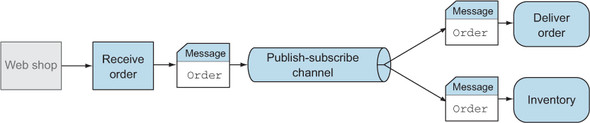
As a bonus, we want to send a present when a customer buys a book. We extend our system with a gift module, and again the order message is needed. Every time we add a new subsystem, we need to change the first step to send the message to more receivers. To solve this problem, we can use the publish-subscribe channel. The channel is able to send the same message to multiple receivers, without the sender knowing about the receivers. Figure 10.4 shows that the published messages are sent to the delivery and inventory subsystems.
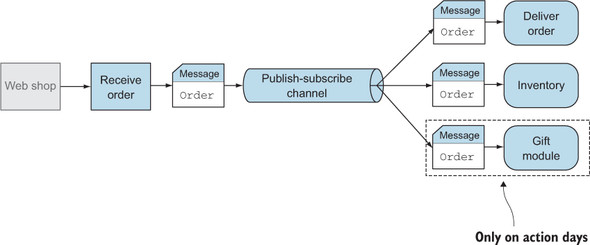
When we want to add the gift functionality, we subscribe to the channel and don’t need to modify the receive-order task. Another benefit of this channel is that the number of receivers can differ during the operation and isn’t static. For example, we don’t want to always send a present, only on the action days. When using this channel, we’re able to add the gift module to the channel only during the action period and remove the module from the channel when there is no gift action. This is shown in figure 10.5.
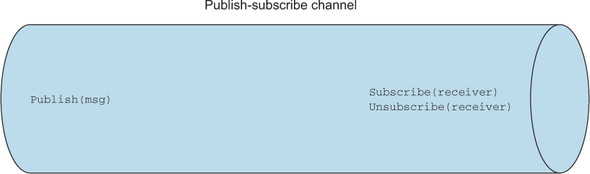
When a receiver is interested in a message of the publisher, it subscribes itself to the channel. When the publisher sends a message through the channel, the channel makes sure that all the subscribers get the message. And when the gift module doesn’t need the order messages, it unsubscribes itself from the channel. This means that the channel methods can be classified by two usages. The first usage is done at the send side: here, one must be able to publish the messages. The other usage is at the receiver side: at this end, the receivers must be able to subscribe to and unsubscribe from the channel. Figure 10.6 shows the two usages.
Because the receivers can subscribe themselves to the channel, this solution is very flexible. The publisher doesn’t need to know how many receivers it has. It’s even possible that it may have no receivers at some point, because the number of subscribers can vary during the operation of the system.