concept timer in category akka
This is an excerpt from Manning's book Akka in Action.
We added the ability to throw an exception to trigger a restart for testing purposes. But when we receive the same message type twice, how will our timeout mechanism work? Because we do nothing when the messages are processed, it isn’t a problem when we get the timeout twice. And because it is a timeout, we don’t want the timer to be reset. In this example only the first timeout will take action when this is necessary, so this simple mechanism will work.
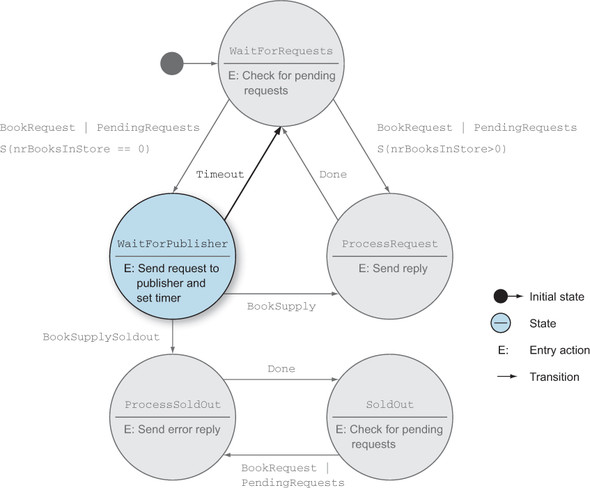
Listing 11.9. Testing inventory with timers
val publisher = TestProbe() val inventory = system.actorOf( Props(new InventoryWithTimer(publisher.ref))) val stateProbe = TestProbe() val replyProbe = TestProbe() inventory ! new SubscribeTransitionCallBack(stateProbe.ref) stateProbe.expectMsg( new CurrentState(inventory, WaitForRequests)) //start test inventory ! new BookRequest("context1", replyProbe.ref) stateProbe.expectMsg( new Transition(inventory, WaitForRequests, WaitForPublisher)) publisher.expectMsg(PublisherRequest) stateProbe.expectMsg(6 seconds, #1 new Transition(inventory, WaitForPublisher, WaitForRequests)) stateProbe.expectMsg( new Transition(inventory, WaitForRequests, WaitForPublisher)) #1 - Waits more than 5 seconds for this transition !@%STYLE%@! {"css":"{\"css\": \"font-weight: bold;\"}","target":"[[{\"line\":18,\"ch\":0},{\"line\":18,\"ch\":50}]]"} !@%STYLE%@!
This method will overrule the default timer setting specified in the WaitForPublisher-when declaration. With this method it’s also possible to turn off the timer by using Duration.Inf as the value in the forMax method.
Beside state timers, there’s also support for sending messages using timers within FSM. The usage isn’t complex, and therefore you just need a quick summary of the API. There are tree methods to deal with FSM timers. The first one is to create a timer:
setTimer(name: String,
         msg: Any,
         timeout: FiniteDuration,
         repeat: Boolean)
All the timers are referenced with their name. With this method you create a timer and define the name, the message to send when the timer expires, the interval of the timer, and if it’s a repeating timer.
The next method is to cancel the timer:
cancelTimer(name: String)This will cancel the timer immediately, and even when the timer has already fired and enqueued the message, the message won’t be processed after this cancelTimer call.
The last method can be used to get the status of the timer at any time:
isTimerActive(name: String): BooleanThis method will return true when the timer is still active. This could be because the timer didn’t fire yet, or because the timer has the repeat set to true.