concept Dialogflow in category alexa

This is an excerpt from Manning's book Voice Applications for Alexa and Google Assistant.
Once the wake word is invoked, the device starts streaming speech over the web for processing, and each platform uses different tooling for this process. Amazon has released its as a stand-alone product called AWS Lex, Google Assistant uses Dialogflow, and Cortana uses LUIS. These tools are forms of what’s called natural language processing (NLP). Let’s look at how this works.
Another difference between Alexa and Google Assistant is that Google Assistant apps are not necessarily tied to a specific natural language understanding platform. Instead, the developer can choose whichever platform they wish. The recommended—and easiest—natural language understanding platform to integrate into Assistant apps is Dialogflow (formerly API.AI). The vast majority of developers will stick with Dialogflow, only bringing in another NLU if they have specialized needs or an existing system in place. Building without Dialogflow is often referred to by Google as building with the Actions SDK.
We’ll build an app using the Actions SDK in chapter 12; in this chapter we’ll build on top of Dialogflow. Using Dialogflow requires less tooling, and you’ll see what Dialogflow provides once we strip it away in chapter 12.
We can later build an app without relying on Dialogflow because of one significant manner in which building for Assistant differs from building for Alexa—Google provides the text of what users say to developers. This is useful when we want to analyze the utterance in any way we choose, and we can also use it for logging and analytics to further improve the user experience. We could alternatively ignore it altogether, relying only on Dialogflow for the NLU and handling of the interaction model. That’s what we’ll do in our first application.
Figure 9.1 Flow of data in a request when using Dialogflow
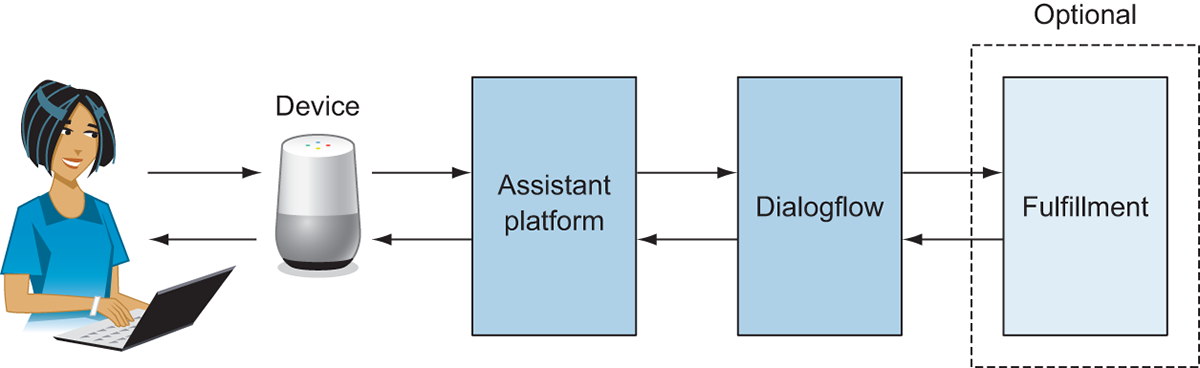
What the user says is in fact sent directly to Dialogflow, and Dialogflow can respond with a fully formed phrase. Dialogflow needs to know where to respond, and that is specified by linking an agent with an Assistant application. Google does this automatically if you go from the Assistant console and you click Create on the agent creation screen.
Listing 11.5 Responding after Assistant handles the daily update registration (index.js)
app.intent("daily_registration_completion", (conv, params, registered) => {    #1
  if (registered && registered.status === "OK") {    #2
    conv.user.storage.update = true;    #2
    conv.close("Ok, starting tomorrow you'll get daily updates.");    #2
  } else {    #3
    conv.close("Alright, I won't be sending you updates each day after all.");    #3
  }
});

#1   The intent name from Dialogflow
#2   If the user completed the daily update registration, note and respond.
#3   Otherwise, still respond.