concept list in category alexa

This is an excerpt from Manning's book Voice Applications for Alexa and Google Assistant.
The list of possibilities is long, but the user doesn’t know what can be done. This opens up the possibility that a user might want to do something that isn’t supported. The VUI can handle it at that point by providing options explicitly:
A list is useful when you need to provide a number of different options to a user, and events certainly fall within this bucket. A list is also useful when the options are similar and you need users to choose one. For example, if a user were to ask for “events for developers,” you might list events for voice developers, for backend developers, and so on. In terms of the information balance between spoken and displayed responses, a list further grows the on-display information.
A list on the display is a good example of the two modes offering their own strengths. Spoken responses are characteristically bad at providing multiple options, especially those with ambiguity. In contrast, lists aren’t the best way of quickly completing tasks. Like a pool and a hot tub, they serve different, and complementary, purposes.
The following code for sending a list is similar to what you’ve seen before, with another built-in helper.
Listing 10.4 Sending a list of events (index.js)
const {
  ...
  List    #1
} = require("actions-on-google");

...

const upcomingEvents = {    #2
  "JS Ninjas": {    #3
    synonyms: [    #4
      "JavaScript ninjas",    #4
      "JavaScript devs"    #4
    ],    #4
    title: "JS Ninjas Over Lunch",    #5
    description: "Friday at noon"    #5
  },
  ...
};

app.intent("get_events", (conv) => {
  const list = new List({
    title: "Upcoming Events",    #6
    items: upcomingEvents
  });

  conv.close("We have upcoming events for JavaScript and voice-first dev.");
  conv.close(list);
});

#1   Imports the List class
#2   An object of list items
#3   A value that the Assistant will provide to the fulfillment when the user presses the item
#4   Other ways for users to reference the item
#5   The display properties for the item
#6   The display title for the entire list
What we do here is provide a list of options and what we want to display on the screen, as in figure 10.6. We send it back to the Assistant platform along with the speech to be spoken out loud.
Figure 10.6 A list, from the simulator
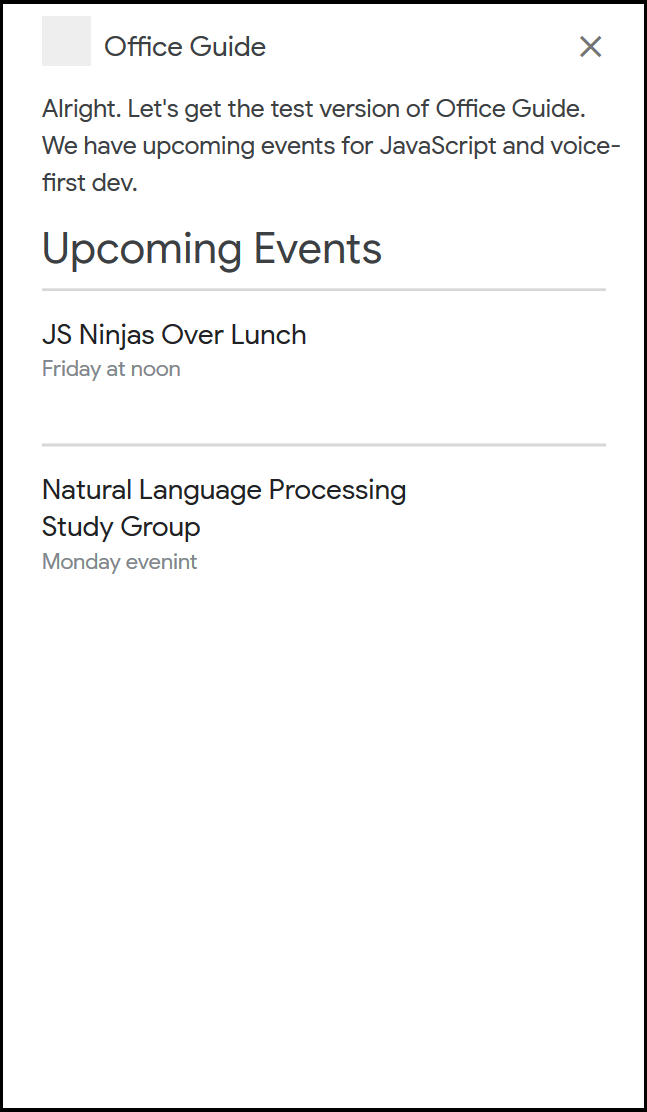
Once again, the list isn’t the entire response—it provides extra information, including text for disambiguation or secondary options.
And, of course, we provide the list items and ways for the user to select an item. The ability for users to make selections shows that we should only use lists when we want it to continue the conversation, and that we need to handle the selections.