concept DDMS tool in category android
This is an excerpt from Manning's book Android in Action, Third Edition.
You can accomplish these tasks in several ways, either by using the DDMS tool or by using the command line from the shell. To get started quickly, let’s first send in direct coordinates through the DDMS tool.
You can access the DDMS tool in two ways, either launched on its own from the SDK tools subdirectory or as the Emulator Control view within the Eclipse IDE. You need to have Eclipse and the Android Eclipse plug-in to use DDMS within Eclipse; see chapter 2 and appendix A for more details about getting the SDK and plug-in set up.
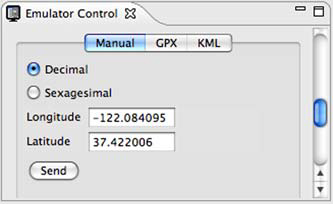
With the DDMS tool you can send direct latitude and longitude coordinates manually from the Emulator Control > Location Controls form. This is shown in figure 11.2. Note that Longitude is the first field, which is the standard around the world, but backward from how latitude and longitude are generally expressed in the United States.