concept HttpURLConnection in category android
This is an excerpt from Manning's book Android in Practice.
In these cases, Java’s baked in HTTP classes are a good choice. More precisely, the two classes you want to turn to are URL and HttpURLConnection, both of which can be found in the java.net package. These two classes work in conjunction with each other; you can’t use one without the other. To send an HTTP request, you first define the URL the request should go to, and then use the same URL object to get a handle to a matching HttpURLConnection. URL therefore, acts as a factory class: you pass it the schematics (the web address) and it spits out a fitting connection object. Codewise, this may look like the following:
URL url = new URL("http://www.example.com/");
HttpURLConnection conn = (HttpURLConnection) url.openConnection();
conn.connect();
...
conn.disconnect();
Wait, you say. Can’t a URL represent an address to any kind of server, not just HTTP? Correct! As it turns out, HttpURLConnection inherits from the more generic URLConnection, which represents a general-purpose data connection to some server using some protocol. Now, how does URL know what kind of connection to return? The simple answer is that it depends on the URL’s scheme (such as http). A protocol handler class looks at the scheme and tries to find a matching connection implementation. The Java class library (and Android) already provides protocol handlers for all common schemes such as HTTP(S), FTP, MAILTO, FILE, and so on, so typically you don’t have to worry about that. This also means that you’re free to create your own protocol handlers that instantiate your own custom URLConnection, but this is something you rarely need to do, so we’re not going to cover it here.
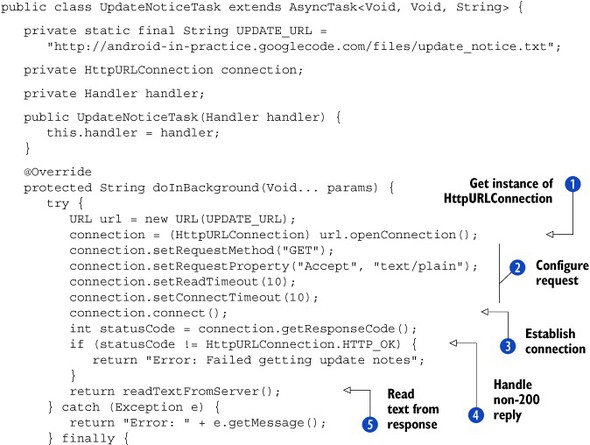
After reading the URL from the parameters, the first thing we have to do is use that URL object to retrieve an instance of a fitting URLConnection instance
(an HttpURLConnection in this case because our URL has the http:// scheme). Note that the call to openConnection doesn’t yet establish a connection to the server; it merely instantiates a connection object. We then configure our HTTP request
. We first tell it that it should use the GET method to request the file (we could’ve omitted this call because GET is the default), and set an HTTP Accept header to tell the server what kind of document we expect it to return (plain text in this case). We also set proper timeouts so that the call won’t block eternally when there are connectivity problems. The request is now configured and can be sent to the server by a call to connect
. Depending on the server reply, we either return an error message if we receive a status message that wasn’t 200/OK
or proceed to read the text from the response body
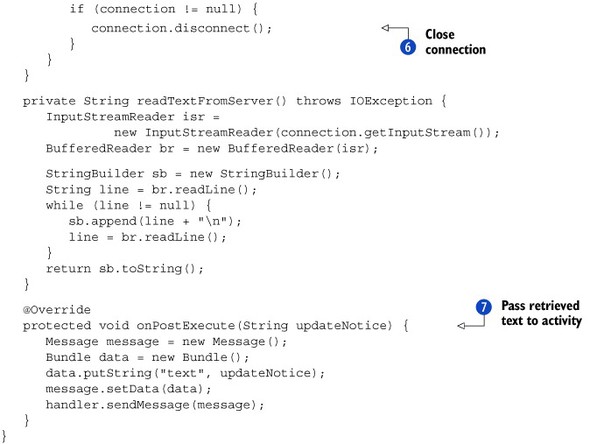
. Don’t forget to close the connection when you’re done processing the response
. Finally, we send the text we received from the server to our main Activity using the Handler, in the same manner as shown in chapter 6
.