concept intent in category android

This is an excerpt from Manning's book Android in Action, Third Edition.
An Intent is a declaration of need. It’s made up of a number of pieces of information that describe the desired action or service. We’re going to examine the requested action and, generically, the data that accompanies the requested action. An IntentFilter is a declaration of capability and interest in offering assistance to those in need. It can be generic or specific with respect to which Intents it offers to service. The action attribute of an Intent is typically a verb: for example VIEW, PICK, or EDIT. A number of built-in Intent actions are defined as members of the Intent class, but application developers can create new actions as well. To view a piece of information, an application employs the following Intent action:
android.content.Intent.ACTION_VIEWThe data component of an Intent is expressed in the form of a URI and can be virtually any piece of information, such as a contact record, a website location, or a reference to a media clip. Table 1.1 lists some Android URI examples.
Table 1.1. Commonly employed URIs in Android
Type of information
URI data
Contact lookup content://contacts/people Map lookup/search Geo:0,0?q=23+Route+206+Stanhope+NJ Browser launch to a specific website http://www.google.com/ The IntentFilter defines the relationship between the Intent and the application. IntentFilters can be specific to the data portion of the Intent, the action portion, or both. IntentFilters also contain a field known as a category. The category helps classify the action. For example, the category named CATEGORY_LAUNCHER instructs Android that the Activity containing this IntentFilter should be visible in the main application launcher or home screen.
When an Intent is dispatched, the system evaluates the available Activitys, Services, and registered BroadcastReceivers (more on these in section 1.5) and dispatches the Intent to the most appropriate recipient. Figure 1.4 depicts this relationship among Intents, IntentFilters, and BroadcastReceivers.
You’ve already created some interesting applications that didn’t require much effort to build. In this chapter, we’ll dig deeper into the use of Intent objects and related classes to accomplish tasks. We’ll expand the RestaurantFinder application from chapter 3, and show you how an Intent can carry you from one Activity to another and easily link into outside applications. Next, you’ll create a new weather-reporting application to demonstrate how Android handles background processes through a Service. We’ll wrap up the chapter with an example of using the Android Interface Definition Language (AIDL) to make different applications communicate with one another.
We introduced the Intent in chapter 1. An Intent describes something you want to do, which might be as vague as “Do whatever is appropriate for this URL” or as specific as “Purchase a flight from San Jose to Chicago for $400.” You saw several examples of working with Intent objects in chapter 3. In this chapter, we’ll look more closely at the contents of an Intent and how it matches with an IntentFilter. The RestaurantFinder app will use these concepts to display a variety of screens.
After you complete the RestaurantFinder application, we’ll move on to WeatherReporter. WeatherReporter will use the Yahoo! Weather API to retrieve weather data and alerts and show them to the user. Along the way, you’ll see how an Intent can request work outside your UI by using a BroadcastReceiver and a Service. A BroadcastReceiver catches broadcasts sent to any number of interested receivers. Services also begin with an Intent but work in background processes rather than UI screens.
An IntentFilter with no categories will match only an Intent with no categories; otherwise, an IntentFilter must have at least what the Intent specifies. For example, if an IntentFilter supports both the HOME and the ALTERNATIVE categories, it’ll match an Intent for either HOME or CATEGORY. But if the IntentFilter doesn’t provide any categories, it won’t match HOME or CATEGORY.
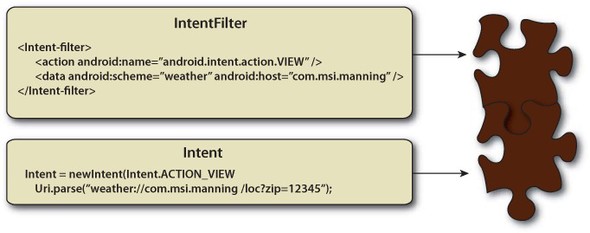
Most matches are straightforward, but as you can see, it can get complicated. Think of Intent and IntentFilter as separate pieces of the same puzzle. When you call an Intent in an Android application, the system resolves the Activity, Service, or BroadcastReceiver to handle your request through this process using the actions, categories, and data provided. The system searches all the pieces of the puzzle it has until it finds one that meshes with the Intent you’ve provided, and then it snaps those pieces together to make the late-binding connection.
Figure 4.3 shows an example of how a match occurs. This example defines an IntentFilter with an action and a combination of a scheme and an authority. It doesn’t specify a path, so any path will match. The figure also shows an example of an Intent with a URI that matches this filter.
If multiple IntentFilter classes match the provided Intent, the platform chooses which one will handle the Intent. For a user-visible action such as an Activity, Android usually presents the user with a pop-up menu that lets them select which Intent should handle it. For nonvisible actions such as a broadcast, Android considers the declared priority of each IntentFilter and gives them an ordered chance to handle the Intent.

This is an excerpt from Manning's book Android in Practice.
The onListItemClick method, which is part of ListActivity, is an event-handling callback. If a user selects an item in a ListView, this method is fired, and we override it
to do whatever we want
. Within it we set some global application state on the previously noted Application object, and then we launch the DealDetails Activity using an Intent. As we’ve touched on, intents are the wiring of Android applications; we’ll learn more about them in section 2.8.
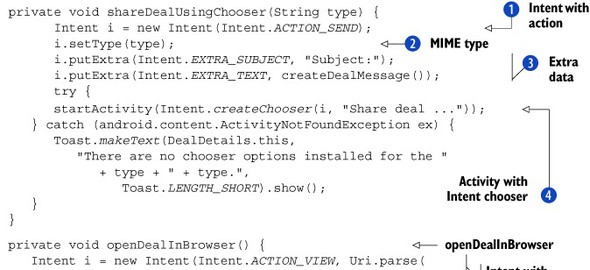
A chooser is a dialog of choices of how to handle an Intent, as we’ll see momentarily. The following listing fills in the detail of exactly how we’re performing these actions through intents, by diving into the shareDealUsingChooser and openDealInBrowser methods.
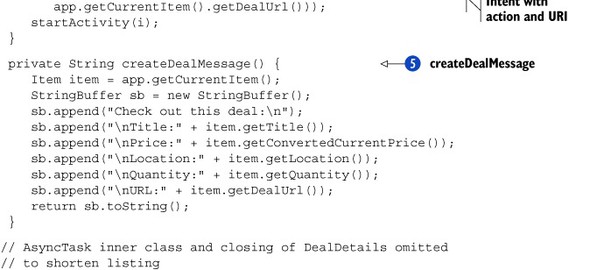
Inside the shareDealUsingChooser method, where we do a lot of Intent-related work, we first set up an Intent with the action set to ACTION_SEND
(which is built by the createDealMessage method
). Once the Intent is ready, we then use startActivity with createChooser to fire it
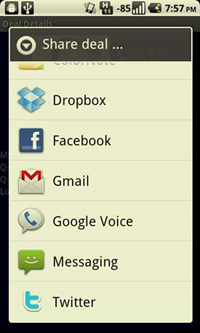
. The chooser shown when we press the Share menu option in DealDroid (on an device, not the emulator, which has fewer capabilities) is seen in figure 2.7.