concept IntentFilter in category android

This is an excerpt from Manning's book Android in Action, Third Edition.
An IntentFilter is a declaration of capability and interest in offering assistance to those in need. It can be generic or specific with respect to which Intents it offers to service.
We introduced the Intent in chapter 1. An Intent describes something you want to do, which might be as vague as “Do whatever is appropriate for this URL” or as specific as “Purchase a flight from San Jose to Chicago for $400.” You saw several examples of working with Intent objects in chapter 3. In this chapter, we’ll look more closely at the contents of an Intent and how it matches with an IntentFilter. The RestaurantFinder app will use these concepts to display a variety of screens.
Android parses each <intent-filter> element into an IntentFilter object. After Android installs an .apk file, it registers the application’s components, including the Intent filters. When the platform has a registry of Intent filters, it can map any Intent requests to the correct installed Activity, BroadcastReceiver, or Service.
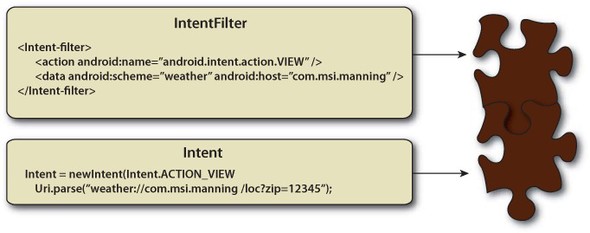
Most matches are straightforward, but as you can see, it can get complicated. Think of Intent and IntentFilter as separate pieces of the same puzzle. When you call an Intent in an Android application, the system resolves the Activity, Service, or BroadcastReceiver to handle your request through this process using the actions, categories, and data provided. The system searches all the pieces of the puzzle it has until it finds one that meshes with the Intent you’ve provided, and then it snaps those pieces together to make the late-binding connection.
Figure 4.3 shows an example of how a match occurs. This example defines an IntentFilter with an action and a combination of a scheme and an authority. It doesn’t specify a path, so any path will match. The figure also shows an example of an Intent with a URI that matches this filter.
If multiple IntentFilter classes match the provided Intent, the platform chooses which one will handle the Intent. For a user-visible action such as an Activity, Android usually presents the user with a pop-up menu that lets them select which Intent should handle it. For nonvisible actions such as a broadcast, Android considers the declared priority of each IntentFilter and gives them an ordered chance to handle the Intent.