concept JavaScript in category android
This is an excerpt from Manning's book Android in Action, Third Edition.
In short, web development is all about building applications with the traditional tools that web developers use: HTML for content, CSS for presentation, and JavaScript for programmatic control. In order for this capable and complementary trio to work their magic, the Android platform relies on the WebKit browser engine.
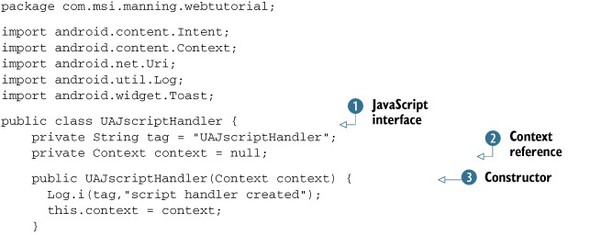
Clearly, the JavaScript implementation is powerful—so powerful that many commercial applications are written with an open source project named PhoneGap that leverages this WebKit browser control technique. PhoneGap provides a framework for developers to create their applications in HTML, CSS, and JavaScript, where the device-specific features are provided in Android SDK Java code. For more information about PhoneGap, visit http://phonegap.com.
This is an excerpt from Manning's book Android in Practice.
For those out there who don’t prefer Java, Android hasn’t forgotten you entirely, and neither have we. We’ll touch on using alternative languages such as Scala in an appendix. And, we’ll also look at building web applications (using JavaScript and CSS, for example) for Android too. These are broad topics so we can’t cover them in depth, but we want to at least introduce them and make sure you know there are options. That said, Java is the main development language of Android, and it’ll be the main language we use throughout this book.
Occasionally in this book, we’ve mentioned how many aspects of Android development are similar to aspects of web development. Some of these are simple things, such as using the findViewById API as a web developer would use JavaScript’s document. getElementById API. Others have been more substantial, such as the way visual styles are created and applied to UI elements. If your expertise is in web development and you’re making the move to Android development, many things will feel familiar. But if you want to leverage your web development skills to build Android apps, another interesting option is available: WebViews.
In listing B.1, we start by enabling JavaScript
in the WebView that’s embedded in our Activity. We then create a WebChromeClient for the WebView. This object will allow us to intercept certain events that occur in the WebView. In this case, we’ll intercept JavaScript alerts and console logs
and route them to the standard Android log. Debugging embedded web pages can be challenging, because you don’t have a standard Java debugger as you do normally in Android development. So you’ll probably need to rely more heavily on logging than you’d like, and the easiest way to do that is to use the WebChromeClient. Next we create a WebViewClient. This is similar to a WebChromeClient, in that it also allows you to intercept other types of events that happen in the WebView—including lifecycle events such as onPageFinished and onReceivedError. In this case,
we intercept a new URL being loaded. We could choose to override this. For example, if we wanted to launch an external browser instead of loading the page in the embedded WebView, you could do something like this:
startActivity(new Intent(Intent.ACTION_GET, Uri.parse(url)));In this case, we’re logging the new URL that’s being loaded. Next comes one of the more interesting steps: we create a Java object and expose it to our JavaScript runtime
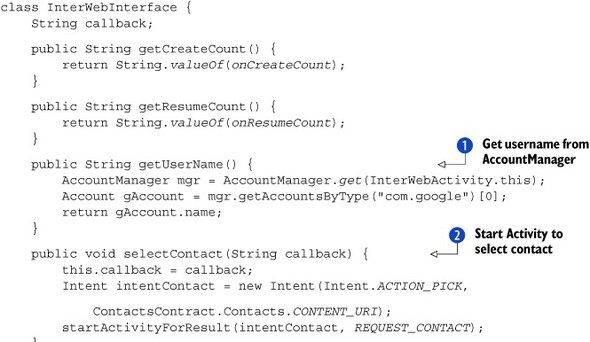
. We give it the name android, so in JavaScript we’ll be able to refer to it by this name. We’ll look at this object and how it’s used shortly. Finally
, we load the web page. In this case, we load a local web page saved in the /assets folder. We could load an external page, but in this case we didn’t want to go to a web server. We wanted to write our application code in HTML, CSS, and JavaScript. The following shows what this Java object does.

The idea behind listing B.2 is to show that there are few limits on what kind of Android functionality you can give your JavaScript access to. In this example, we provide access to the user’s name by using the AccountManager