concept map in category android

This is an excerpt from Manning's book RxJava for Android Developers.
An application consists of distinct tasks the user performs. These could, for instance, be choosing a contact to whom to send a message or searching for a location on a map.
You might have noticed already that the output of the store changed into a collection of ChatMessages. A collection is an unordered list, and the reason it happened is the map doesn’t rely on the order in which items are inserted. You could say the messages were in the right order because of luck.
This is an excerpt from Manning's book Android in Action, Third Edition.
Figure 1.7 shows the sample application in action. Someone looked up the address of the White House; the result shows the White House pinpointed on the map.
In addition to displaying data based on the current location, you’ll use this application to create several LocationListener instances that receive updates when the user’s location changes. When the position changes, the device will inform your application, and you’ll update your MapView using an Overlay—an object that allows you to draw on top of the map.
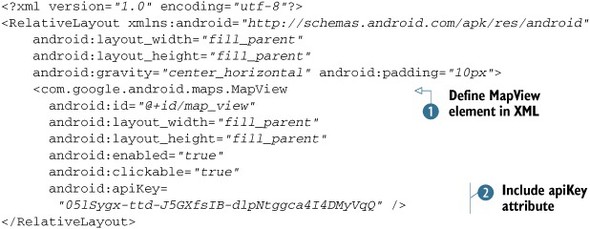
Before you can use a map at all, you have to request a Google Maps API key and declare it in your layout file. This listing shows the MapActivity layout file you’ll use with a special android:apiKey attribute.
You can declare a MapView in XML just like other View components
. In order to use the Google Maps network resources, a MapView requires an API key
. You can obtain a map key from the Google Maps Android key registration web page at http://code.google.com/android/maps-api-signup.html.
Overlay describes an item to draw on the map. You can define your own Overlay by extending this class or MyLocationOverlay. The MyLocationOverlay class lets you display a user’s current location with a compass, and it has other useful features such as a LocationListener for convenient access to position updates.
Besides showing the user’s location, you’ll often place multiple marker items on the map. Users generally expect to see markers as pushpins. You’ll create buoy markers for the location of every buoy using data you get back from the NDBC feeds. Android provides built-in support for this with the ItemizedOverlay base class and the OverlayItem.
This is an excerpt from Manning's book Android in Practice.
Using adapters this way is a powerful approach for managing dynamic data that’s completely decoupled from any views, and therefore from how it’s being displayed. Even though we didn’t write that much code, sometimes this is too much complexity already. If you only need to ask the user to select from multiple choices in a list (a list dialog would be a good example), then there’s a much easier way than implementing your own adapter: the ListView choiceMode attribute. With the choice mode set to multipleChoice, you can receive any list items the user selected by calling ListView.getCheckedItemIds(). This roughly corresponds to the map of Boolean values we maintain. You can also set the choice mode programmatically using ListView.setChoiceMode. This is one instance where state is only maintained in the views, without a model behind it, but it’s a limited approach.
The Location object in Android stores latitude and longitude as type double. Other classes, such as GeoPoint, which we’ll see in the maps API soon, use type int. Both represent the same location; the integer type is the microdegrees representation. The 1E6 means multiply the double value by 1 million. You can multiply or divide by 1E6 to go back and forth between the two representations.
Probably the most common usage of a Google Map (outside of navigation) is placing markers and routes on the map using custom or personal data sources. We noted in the previous listing that our data is being placed into an ItemizedOverlay, and now we need to build that class to complete our map.