concept phone number in category android

This is an excerpt from Manning's book Android in Action, Third Edition.
Suppose that you want to call a restaurant to make a reservation. When you’re crafting an Intent for this, you need to include two critical pieces of information. An action is a verb describing what you want to do—in this case, make a phone call. Data is a noun describing the particular thing to request—in this case, the phone number. You describe the data with a Uri object, which we’ll describe more thoroughly in the next section. You can also optionally populate the Intent with other information that further describes how to handle the request. Table 4.1 lists all the components of an Intent object.
In this chapter, we’ll discuss telephony in general and cover terms related to mobile devices. We’ll move on to basic Android telephony packages, which handle calls using built-in Intent actions, and more advanced operations via the TelephonyManager and PhoneStateListener classes. The Intent actions can initiate basic phone calls in your applications. TelephonyManager doesn’t make phone calls directly but is used to retrieve all kinds of telephony-related data, such as the state of the voice network, the device’s own phone number, and other details. TelephonyManager supports adding a PhoneStateListener, which can alert you when call or phone network states change.
Applications running on mobile devices that support telephony deal with a lot of String formatting for phone numbers. Fortunately, the Android SDK provides a handy utility class that helps to mitigate the risks associated with this task and standardize the numbers you use—PhoneNumberUtils.
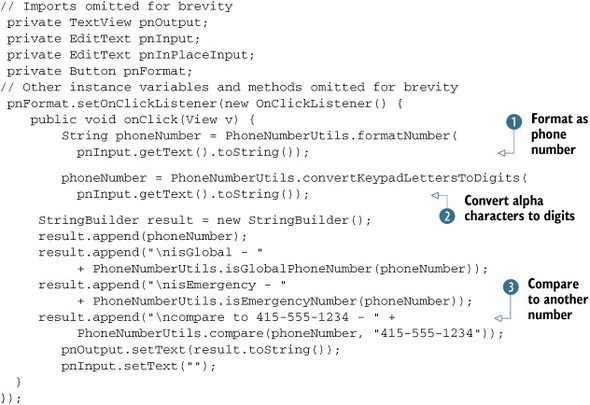
The PhoneNumberUtils class parses String data into phone numbers, transforms alphabetical keypad digits into numbers, and determines other properties of phone numbers. The following listing shows an example of using this class.
The PhoneNumberUtils class offers several static helper methods for parsing phone numbers, including the useful formatNumber. This method takes a single String as input and uses the default locale settings to return a formatted phone number
. Additional methods format a number using a locale you specify, parse different segments of a number, and so on. Parsing a number can be combined with another helpful method, convertKeypadLettersToDigits(), to convert any alphabetic keypad letter characters into digits
. The conversion method won’t work unless it already recognizes the format of a phone number, so you should run the format method first.