concept platform in category android
This is an excerpt from Manning's book Android in Action, Third Edition.
One feature of the Android platform is that there’s no difference between the built-in applications and applications that you create with the SDK. This means that you can write powerful applications to tap into the resources available on the device. Figure 1.1 shows the relationship between Android and the hardware it runs on. The most notable feature of Android might be that it’s open source; missing elements can and will be provided by the global developer community. Android’s Linux kernel-based OS doesn’t come with a sophisticated shell environment, but because the platform is open, you can write and install shells on a device. Likewise, multimedia codecs can be supplied by third-party developers and don’t need to rely on Google or anyone else to provide new functionality. That’s the power of an open source platform brought to the mobile market.
Along with the components you use to build an application—views, resources, and activities—Android includes the manifest file we introduced in chapter 1: AndroidManifest.xml. This XML file provides entrance points into your app, as well as describes what permissions it has and what components it includes. Because every Android application requires this file, we’ll address it in more detail in this chapter, and we’ll come back to it frequently in later parts of the book. The manifest file is the one-stop shop for the platform to start and manage your application.
The lifecycle methods provided by the Activity class are called in a specific order by the platform as it decides to create and kill processes. Because you, as an application developer, can’t control the processes, you need to rely on the callback lifecycle methods to control state in your Activity classes as they come into the foreground, move into the background, and fall away altogether. As the user makes choices, activities are created and paused in a defined order by the system as it starts and stops processes.
This is an excerpt from Manning's book Android in Practice.
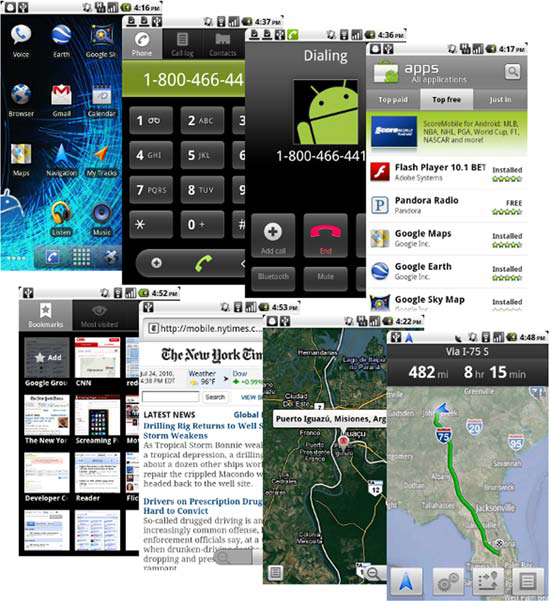
A consortium of companies known as the Open Handset Alliance, led by Google, looked at the landscape several years ago and asked the question “What would it take to build a better mobile phone?” By better they meant a phone that could overcome the hurdles holding back widespread collaboration, innovation, and adoption on other platforms. The answer they came up with was Android. Android is a powerful and open platform that anyone can use and extend. Figure 1.1 shows a montage of screen shots that demonstrate a few of the platform’s capabilities.
At this point in our journey, you should have a solid understanding of what Android is and some of the motivation behind its creation. Android has a recurring theme, as we’ve seen—it’s open. The platform is open and can be used by anyone. Its code is open and can be tailored to meet different needs. Even its tools are open and give developers the freedom of choice when it comes to how they’ll develop their applications. The importance of this aspect can’t be understated; it’s what sets Android apart.