concept process in category android

This is an excerpt from Manning's book Android in Action, Third Edition.
A Linux kernel that provides a foundational hardware abstraction layer, as well as core services such as process, memory, and filesystem management. The kernel is where hardware-specific drivers are implemented—capabilities such as Wi-Fi and Bluetooth are here. The Android stack is designed to be flexible, with many optional components that largely rely on the availability of specific hardware on a given device. These components include features such as touch screens, cameras, GPS receivers, and accelerometers.
The most likely candidates for termination are processes that are empty (loaded perhaps for performance-caching purposes) or processes that have dormant Activitys.

This is an excerpt from Manning's book Android in Practice.
Our first Android application will display a single line of text and one image on a single screen. It isn’t impressive, but we’re keeping it simple on purpose. We want the components of the application, and the process, to take center stage. The application we’ll build, “Hello Android,” is seen in completed form running in the emulator in figure 1.3.
Much like processes, activities don’t get to hang around forever and suck up memory and CPU cycles. Even within a process, with multiple activities associated to the same application, some activities will be in the foreground and others won’t. Those in the foreground, the ones the user is working with, get the priority. Other activities may be stopped when the platform needs to reclaim resources (or killed if the process hosting them is itself killed, based on the hierarchy we discussed in the previous section).
Users aren’t supposed to notice any of the process and activity swapping that the platform does. To them the entire workflow of any task they want to perform should be seamless. If some activities are created new, and some are restored from an inactive state, the user doesn’t care and shouldn’t notice.
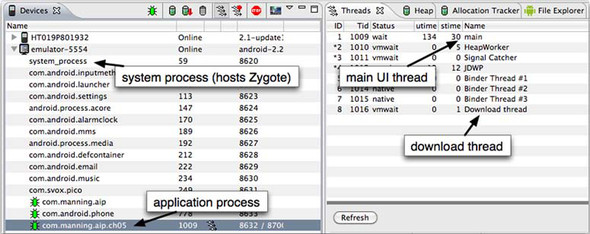
Typically, and by default, the process/application/thread/component arrangement is repeated, with a separate user ID and within a separate process, for each application. The OS manages the multiple processes, and the Android interprocess communication (IPC) mechanism is used to pass data between processes. If you run the ps command from the ADB shell, or use Device -> Show Process Status from the DDMS tool (which runs ps), you can examine the currently running processes, as seen in figure 3.2.