concept task in category android

This is an excerpt from Manning's book Android in Practice.
Multitasking offers the huge benefit of not having to exit an application when launching another, improving the overall user experience. This is important on platforms where interaction between applications is part of the system’s overall design, which is the case for Android. Android balances the potentially significant cost of multiple applications running simultaneously in a limited environment with some design choices. Specifically Android gives preference to applications the user is currently interacting with, or has used most recently, and all applications are run in a stack. We’ll learn more about the lifecycle of Android applications, and processes and tasks, in chapter 3, but the platform manages the system resources by balancing the most relevant applications.
After we have the process-application-component picture down, we’ll touch on the concept of tasks in Android. A task is a group of activities that are related based on what business action the user is trying to accomplish. Such activities may come from different Android applications, but to the user, they appear as one. Knowing a bit about activities, the activity stack, and how they relate to tasks, will help you understand the platform and build better applications.
We’ve already discussed the technical definition of a group of components in the same root package bundled into an APK file—that’s an Android application. Still, as we noted previously, that’s not what a user considers an application. To a user, an application consists of all of the activities they need to get something done. To Android this group of activities is a task.
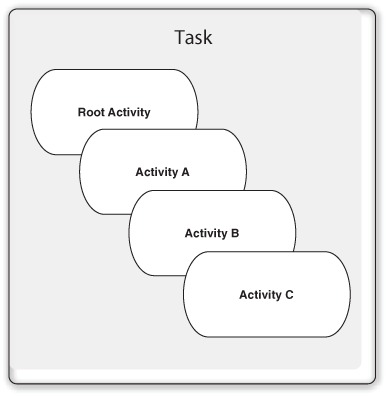
One Activity always kicks off a task, and it’s known as the root activity. Most of the time the root Activity is started via the Home screen (the Launcher application). From there, each Activity involved in the task is added to the task activity stack and the entire task is treated as a unit, as depicted in figure 3.11.
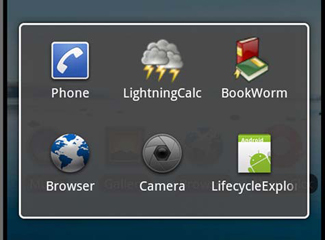
Another way to see how activities are grouped into tasks—and to see the current running tasks on a device—is to long press on the Home key. This will bring up the Recent Tasks switcher, which shows an icon and name for each task, based on the root Activity, as seen in figure 3.12.