concept user in category android

This is an excerpt from Manning's book RxJava for Android Developers.
You’ll next see the building blocks of Android applications, which include activities. For now, it’s enough to think of an activity as a specific screen that’s shown to the user. The MainActivity activity is typically the one that’s displayed first.
In this context, by features I mean functionality that can be fine-grained. Scenarios such as a server failing to respond or the user clicking a button rapidly several times are seldom explicitly defined before a bug report comes in.

This is an excerpt from Manning's book 50 Android Hacks.
Before adding the SyncAdapter to our code, let’s first see how to deal with the authentication with the server. Instead of saving the login details inside a database or a shared preference, we’ll save them in an Android Account. To handle accounts, we’ll use an Android class called AccountManager. The AccountManager is in charge of managing user credentials inside Accounts. The basic idea is that users enter their credentials once, and they’re saved inside an Account. All of the applications that have the USE_CREDENTIALS permission can query the manager to obtain an account where an authentication token or whatever is necessary to authenticate against a server is saved.
Imagine you’re creating an application that downloads music. It’s important that every media file you download gets added to the media ContentProvider. Otherwise, the user will not be able to use that media from another application.
Listening to your users’ feedback is one of many ways to help make your application successful. User feedback can highlight which sections they enjoy the most, and they’ll likely ask for new features that help to improve your application. During my years as a developer in the Android market, I’ve noticed that every time I fix a bug or add a feature requested by a user, more people start downloading my application. What’s at play here is word of mouth. The preceding is a good scenario—users let the developer know what problem they’re having, though sometimes users don’t provide enough explanation, which makes it difficult to identify the problem.

This is an excerpt from Manning's book Android in Action, Third Edition.
An Intent is evaluated and passed to the most appropriate handler. In the case of picking a contact record, the recipient would likely be a built-in Activity named com.google.android.phone.Dialer. But the best recipient of this Intent might be an Activity contained in the same custom Android application (the one you build), a built-in application (as in this case), or a third-party application on the device. Applications can leverage existing functionality in other applications by creating and dispatching an Intent that requests existing code to handle the Intent rather than writing code from scratch. One of the great benefits of employing Intents in this manner is that the same UIs get used frequently, creating familiarity for the user. This is particularly important for mobile platforms where the user is often neither tech-savvy nor interested in learning multiple ways to accomplish the same task, such as looking up a contact on the phone.
Over the course of this chapter and the next, you’ll build a sample application that allows users to search for restaurant reviews based on location and cuisine. This application, RestaurantFinder, will also allow the user to call the restaurant, visit its website, or look up map directions. We chose this application as a starting point because it has a clear and simple use case, and because it involves many different parts of the Android platform. Making a sample application will let us cover a lot of ground quickly, with the additional benefit of providing a useful app on your Android phone.

This is an excerpt from Manning's book Android in Practice.
Even though it’s open and powerful, Android isn’t perfect. Android doesn’t get everything right, but we think it’s a big step in the right direction. Android avoids many of the issues surrounding proprietary systems by being open source and being licensed in an open manner (with no licensing fees whatsoever). Android provides an approachable and accessible (free) SDK and other development tools. And, Android deals with getting applications in front of users with a built-in market application that allows users to easily download and install apps right from their phones.
Does this mean that a user whose device doesn’t have a camera won’t be able to install our application? Not exactly. The OS doesn’t check the manifest at install-time. But the Android Market app does check the manifest and the list of features on the device and compares them. It does this to filter out apps that a user wouldn’t be able to run properly. If you assume that users will only get your app from the Android Market, then they’d never see your app there if their device doesn’t have necessary features.
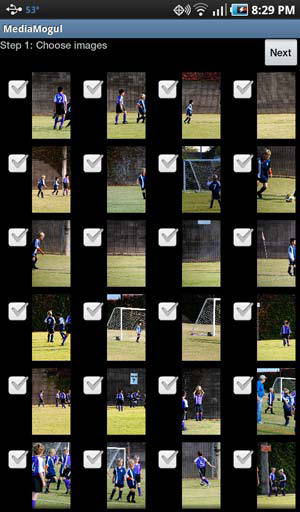
Our MediaMogul application will start off by allowing the user to pick multiple images from their device to use for the slideshow that they’ll build. Figure 11.1 shows you what the final result will look like.
The user could have a lot of images to choose from. While they browse and select those images, let’s play some soothing theme music in the background. The sound file that we want to use will be distributed with our application. The best place to put it is in the /res/raw directory. Files in this directory will have resource identifiers generated for them, but otherwise these files are opaque to the Android build tool and will be bundled with your application as-is. The following listing shows how these files can be referenced from within your application.
The Activity gets a handle to a button on the screen
. The user needs to tap on this button to initiate the video selection process. When this happens, we want to start a common Activity that calls the Activity to get the content. It can be referenced using the constant string Intent.ACTION_GET_CONTENT
. This Activity has an Intent filter saying it will handle any Intents that specify Intent.ACTION_GET_CONTENT as their action. This Activity can be used for different types of files and multimedia, but we only want videos. We declare that its MIME type should be video/*
—any kind of video, regardless of its format/encoding. Finally we use Activity’s startActivityForResult method to start the get content Activity
.
Now startActivityForResult is an asynchronous call (it returns void). But it’ll cause the Activity to be displayed in the foreground, so it’ll seem synchronous to the user. It’s still asynchronous though, so we must provide a callback to get the result. The Activity class already defines this callback—the Activity class’s onActivityResult method. We override this method
. This method will receive an Intent, and we can use this Intent’s getData method to retrieve the URI of the video that the user selected
.
In figure 11.5, the image on the left is our application’s UI. You can see the Select Video button referenced in listing 11.6. When the user taps on it, the Activity is started. It uses a Gallery widget to show files to choose from, shown on the right side of figure 11.5. This shows the videos organized by location. If it finds more than one video, they’ll be shown as a stack. Tapping on a stack changes it to a grid that allows the user to choose a video. It’s a nice UI, for free! Further, this is used by many Android apps, so users are familiar with the interface and how it works.