concept web service in category android
This is an excerpt from Manning's book Android in Action, Third Edition.
After we cover general IP networking with regard to Android, we’ll discuss turning the server side into a more robust API itself by using web services. On this topic, we’ll work with plain old XML over HTTP (POX) and Representational State Transfer (REST). We’ll also discuss the Simple Object Access Protocol (SOAP). We’ll address the pros and cons of the various approaches and why you might want to choose one method over another for an Android client.
The term web services means many different things, depending on the source and the audience. To some, it’s a nebulous marketing term that’s never pinned down; to others, it’s a rigid and specific set of protocols and standards. We’re going to tackle it as a general concept, without defining it in depth, but not leaving it entirely undefined either.
Web services are a means of exposing an API over a technology-neutral network endpoint. They’re a means to call a remote method or operation that’s not tied to a specific platform or vendor and get a result. By this definition, POX over the network is included; so are REST and SOAP—and so is any other method of exposing operations and data on the wire in a neutral manner.
This is an excerpt from Manning's book Android in Practice.
Think about how flexible the adapter solution is. If we were to store our data in a database, or retrieve it in a paged fashion from a web service, we could replace our adapter object with one that iterates over the data source we need. We wouldn’t have to change a thing about our list view. That’s loose coupling and object orientation par excellence.
So far so good, but we can customize even more—the client object itself for instance. It always makes sense to set a default HTTP user agent, so the application can identify itself to the web service. We also want to reduce the timeouts for establishing a connection and idle time when retrieving data because this can happen frequently on a mobile device:
HttpParams clientParams = new BasicHttpParams();
HttpProtocolParams.setUserAgent(clientParams, "MyMovies/1.0");
HttpConnectionParams.setConnectionTimeout(clientParams, 15 * 1000);
HttpConnectionParams.setSoTimeout(clientParams, 15 * 1000);
httpClient = new DefaultHttpClient(cm, clientParams);
You can customize plenty more, but these are good defaults when accessing a web service. Your mileage may vary, depending on the kind of communication you plan to do. Now that you’ve seen how to fully customize an HTTP client instance, we can tell you: if you’re targeting Android 2.2 or above, you don’t have to do anything shown in this technique yourself! As we mentioned briefly before, Android bundles a custom implementation of HttpClient called AndroidHttpClient with that version. This implementation has already been optimized for mobile use, and it does all the stuff like setting proper timeouts and a thread-safe connection manager. It also supports HTTPS by default. In order to use it, you’d replace the code at
in listing 9.4 with this:
A web service is a set of server-side interfaces exposed on the Internet using web technologies such as HTTP for data transfer or XML and JSON for data serialization. Unlike web sites, web services are meant to be consumed by machines, not human beings.
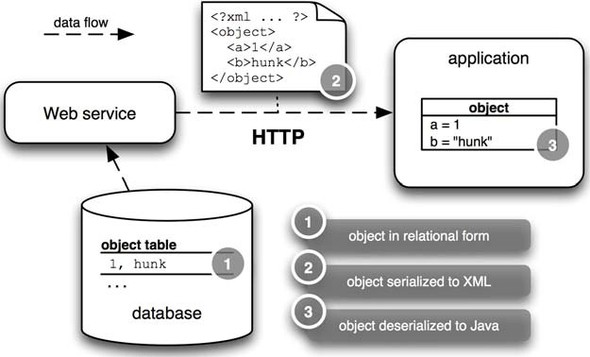
Because the data backing a web service is always structured (it’s typically served from a database-driven back end), it must be serialized in some way so that it can be transferred over the wire and reconstructed on the client side without losing this structure. Data serialization (also called marshalling) is therefore the task of turning data such as table rows or objects into some ordered, well-structured, stable format. The client can then deserialize the service response into a representation of the data it can understand (such as a Java object). Figure 9.5 illustrates how communication between a web service and a mobile client typically looks.
Figure 9.5. A typical data serialization/deserialization scenario in a web environment. An application requests an object from a web service via HTTP, where the object is first read from a database table, is then serialized to XML, transferred via HTTP, and finally deserialized by the application into a Java object.