concept error in category ant
appears as: error,
The error, The error, n error, errors, error

This is an excerpt from Manning's book Ant in Action.
The error you’re likely to see most often in Ant is the build halting after the compiler failed to compile your code. If, for example, someone forgot the semicolon after the println call, the compiler error message would appear, followed by the build failure:
Buildfile: build.xml
compile:
 [javac] Compiling 1 source file
 [javac] /home/ant/firstbuild/Main.java:5: ';' expected
 [javac] System.out.println("hello, world")
 [javac]                                   ^
 [javac] 1 error

BUILD FAILED
/home/ant/firstbuild/build.xml:4: Compile failed, messages
     should have been provided.

Total time: 4 seconds
The build failed on the same line as the error in the previous example, line 4, but this time it did the correct action. The compiler found something wrong and printed its messages, and Ant stopped the build. The error includes the name of the Java file and the location within it, along with the compiler error itself.
trycatch:
  [get] Getting: http://localhost:8080/
  [get] To: C:\diary\core\null1319877082.html
  [get] Error getting http://localhost:8080/ to
        C:\diary\core\null1319877082.html
 [echo] Caught: java.net.ConnectException: Connection refused: connect
 [echo] cleanup

BUILD FAILED
C:\diary\core\core-chapter-09.xml:118:
  java.net.ConnectException: Connection refused: connect
Test Run ant -version from the command line: a version number and build time should appear. If the command interpreter complains that ant is unknown, then the path is wrong. If the error is that the Java command is unknown, then the problem is actually with the Java installation, covered earlier. Fix Modify the environment path variable to include the Ant scripts, log out, and reboot or otherwise reload the environment to have the change applied.
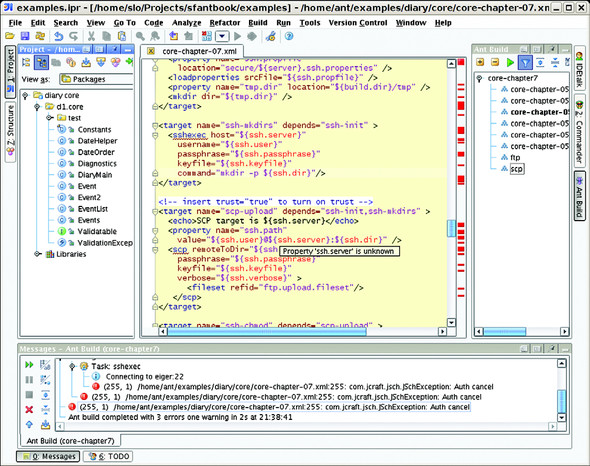
Figure C.12. IntelliJ IDEA running the SSH upload targets of chapter 7. The connection is failing, and an error is appearing in the messages window. Clicking on the error brings up the line of the build file. IDEA highlights all unknown properties—here it is marking as unknown all properties loaded from the server-specific properties file.