concept container in category apache airflow
This is an excerpt from Manning's book Data Pipelines with Apache Airflow.
Some people prefer to rely on generic operators such as the built-in DockerOperator and the KubernetesPodOperator to execute their tasks. An advantage of this approach is that you can keep your Airflow installation super-lean, as Airflow is only coordinating containerized jobs - you can keep all dependencies of specific tasks with the container. We’ll focus this approach further in a future chapter.
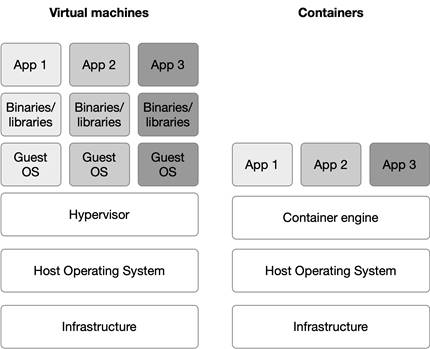
This limitation of VMs lead to the development of container-based virtualization, which is a much more lightweight approach than VMs (Figure 11.3). In contrast to VMs, container-based virtualization approaches use kernel-level functionality in the host operating system to virtualize applications. This means containers can segregate applications and their dependencies in the same fashion as VMs, but without requiring each application to run it’s own operating system - they can simply leverage this functionality from the host OS.
Figure 11.3 - Comparison between virtual machines (VMs) and containers. Note that containers are much more lightweight as they don’t require running a full guest OS for each application.
Interaction between containers and the host operating system is often managed by a service called the container engine, which provides an API for managing and running the different application containers and their images. This service often also provides command line tooling that helps users build and interact with their containers. The most well known container engine is Docker, which has gained a lot of popularity over the years due to its relative ease of use and large community.
To share files with your container you either need to make sure that the files are available in a file system that your container has access to. One commonly used option is to read/write files using storage that can be accessed via the internet (such as Amazon’s S3 storage) or local network. Alternatively, you can mount files or folders from your host system into the container to make them accessible from within the container.
To mount a file or folder into your container, you need to supply a --volume argument to docker run that specifies the file/folder to mount and the desired path inside the container:
Listing 11.10 .
$ docker run --volume `pwd`/data:/data wttr-example ... #AThis effectively tells Docker to mount the local folder ‘data’ under the path /data within the container. This means that we can now write our weather output to the mounted data volume using the following command: