concept failure in category apache airflow
This is an excerpt from Manning's book Data Pipelines with Apache Airflow.
By default, Airflow can handle failures in tasks by retrying them a couple of times (optionally with some wait time in between), which can help tasks recover from any intermittent failures. If retries don’t help, Airflow will record the task as being failed, optionally notifying you about the failure if configured to do so. Debugging task failures is pretty straight forward, as the tree view allows you to view which tasks failed and dig into their logs. The same view also allows you to clear the results of individual tasks to re-run them (together with any tasks that depend on that task), allowing you to easily re-run any tasks after you make changes to their code.
One advantage of explicitly specifying task dependencies, is that it clearly defines the (implicit) ordering in our tasks. This enables Airflow to schedule tasks only when their dependencies have been met, which is more robust than (for example) scheduling individual tasks one after another using cron and hoping that preceding tasks will have completed by the time the second task is started (Figure 5.2). Moreover, any errors will be propagated to downstream tasks by Airflow, effectively postponing their execution. This means that in the case of a failure in the download_launches task, Airflow won’t try to execute the get_pictures task for that day until the issue with download_launches has been resolved.
We can easily test this by simulating a failure in one of the tasks. For example, by simulating a failure in the fetch_sales task, we can see that Airflow will record the failure by assigning the fetch_sales the ‘failed’ state, rather than the ‘success’ state used for successful executions (Figure 5.15). This means that the downstream process_sales task can no longer be executed, as it requires fetch_sales to be successful. As a result, the clean_sales task is assigned the state ‘upstream_failed’, which indicates that it cannot proceed as a result of the upstream failure.
Figure 5.15. An upstream failure stops downstream tasks from being executed with the default trigger rule ‘all_success’, which requires all upstream tasks to be successful. Note that Airflow does continue executing tasks which do not have any dependency on the failed task (fetch_weather and process_weather).
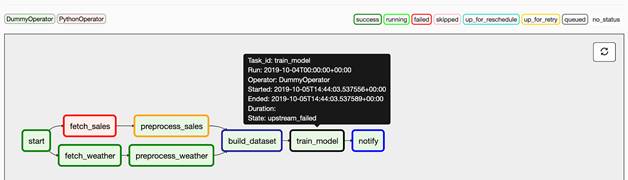
This type of behaviour, where the result of upstream tasks also affects downstream tasks is often referred to as ‘propagation’, as in this case the upstream failure is ‘propagated’ to the downstream tasks. Besides failures, the effects of skipped tasks can also be propagated downstream by the default trigger rule, resulting in all tasks downstream of a skipped task also being skipped.
This propagation is a direct result of the definition of the ‘all_success’ trigger rule, which requires all of its dependencies to have completed successfully. As such, if it encounters a skip or failure in a dependency, it has no other option than to fail in a similar manner, thus propagating the skip or failure.