concept runtime in category apache airflow
This is an excerpt from Manning's book Data Pipelines with Apache Airflow.
For every interval, we’ll have to insert the date & time for that specific interval in the URL. We touched scheduling and (briefly) how to use the execution date in our code to make it execute for one specific interval in Chapter 3, let’s dive a bit deeper into how it works. There are many ways to download the pageviews; however, let’s focus on the BashOperator and PythonOperator. The method to insert variables at runtime in those operators can be generalized to all other operator types.
As briefly touched upon in Chapter 3, the execution_date is one of the variables that is “magically” available in the runtime of a task. The double curly braces denote a Jinja templated string. Jinja is a templating engine, which replaces variables and/or expressions in a templated string at runtime. Templating is used when you, as a programmer, don’t know the value of something at the time of writing, but do know the value of something at runtime. An example is when you have a form in which you can insert your name, and the code prints the inserted name:
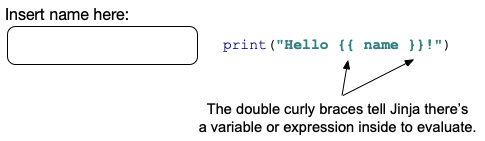
The value of name is not known at programming time because the user will enter his/her name in the form at runtime. What we do know is that the inserted value is assigned to a variable called name, and we can then provide a templated string "Hello {{ name }}!" to render and insert the value of name at runtime.
In Airflow, you have a number of variables available at runtime from the task context. One of these variables is execution_date. Airflow uses the Pendulum[10] library for datetimes and execution_date is such a Pendulum object. It is a drop-in replacement for native Python datetime, so all methods that can be applied to Python datetime can also be applied to Pendulum datetime. So just like you can do datetime.now().year, you get the same result with pendulum.now().year: