concept sensor in category apache airflow

This is an excerpt from Manning's book Data Pipelines with Apache Airflow.
One way to solve this in Airflow is with the help of sensors, which are a special type (subclass) of operators. Sensors continuously poll for certain conditions to be true, and succeed if so. If false, the sensor will wait and try again until either the condition is true, or a timeout is eventually reached:
Listing 6.1
from airflow.contrib.sensors.file_sensor import FileSensor

wait_for_supermarket_1 = FileSensor(
   task_id="wait_for_supermarket_1",
   filepath="/data/supermarket1/data.csv",
)
This FileSensor[16] will check for the existence of /data/supermarket1/data.csv and return True if the file exists. If not, it returns False and the sensor will wait for a given period (default 60 seconds) and try again. Both operators (sensors are also operators) and DAGs have configurable timeouts, and the sensor will remain to check the condition until a timeout is reached. We can inspect the output of sensors in the task logs:
[2019-10-13 11:39:09,757] {file_sensor.py:60} INFO - Poking for file /data/supermarket1/data.csv
[2019-10-13 11:40:09,752] {file_sensor.py:60} INFO - Poking for file /data/supermarket1/data.csv
[2019-10-13 11:41:09,713] {file_sensor.py:60} INFO - Poking for file /data/supermarket1/data.csv
[2019-10-13 11:42:09,714] {file_sensor.py:60} INFO - Poking for file /data/supermarket1/data.csv
[2019-10-13 11:43:09,711] {file_sensor.py:60} INFO - Poking for file /data/supermarket1/data.csv
Here we see that approximately once a minute[17], the sensor “pokes” for the availability of the given file. “Poking” is Airflow’s name for running the sensor and checking the sensor condition.
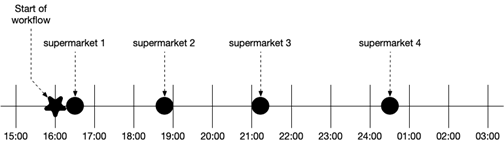
When incorporating sensors into this workflow, one change should be made. Now that we know we won’t wait until 2 AM and assume all data is available, but instead start continuously checking if the data is available or not, the DAG start time should be placed at the start of the data arrival boundaries: