concept time in category apache airflow
This is an excerpt from Manning's book Data Pipelines with Apache Airflow.
Besides this flexibility, another advantage of Airflow’s Python foundation is that tasks can execute any operation that you can implement in Python. Over time, this has led to the development of many Airflow extensions that allow you to execute tasks across a wide variety of systems, including external databases, big data technologies and various cloud services; allowing you to build complex data pipelines bringing together data processes across many different systems.
To understand how Airflow’s scheduling works, we’ll first consider a small example. Imagine we have a service that tracks user behavior on our website and allows us to analyze which pages users (identified by an IP address) accessed on our website. For marketing purposes, we would like to know how many different pages are accessed by our users and how much time they spend during each visit. To get an idea of how this behavior changes over time, we want to calculate these statistics on a daily basis as this allows us to compare changes across different days and larger time periods.
For practical reasons, the external tracking service does not store data for more than 30 days. This means that we need to store and accumulate this data ourselves, as we want to retain our history for longer periods of time. Normally, because the raw data might be quite large, it would make sense to store this data in a cloud storage service such as Amazon’s S3 or Google’s Cloud Storage service, as these services combine high durability with relatively low costs. However, for simplicity’s sake, we won’t worry about these things yet and keep our data locally.
As we’ve seen, we can control when Airflow runs a DAG with three parameters: a start date, a schedule interval and an (optional) end date. To actually start scheduling our DAG, Airflow uses these three parameters to divide time into a series of schedule intervals, starting from the given start date and optionally ending at the end date (Figure 3.5).
Figure 3.5. Time represented in terms of Airflow’s scheduling intervals. Assumes a daily interval with a start date of 2019-01-01
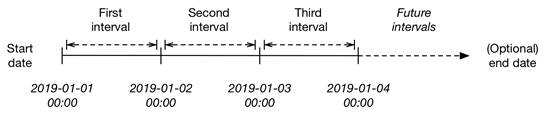
In this interval-based representation of time, a DAG is executed for a given interval as soon as the time slot of that interval has passed. For example, the first interval in Figure 3.5 would be executed as soon as possible after 2019-01-01 23:59:59, as by then the last time point in the interval has passed. Similarly, the DAG would execute for the second interval shortly after 2019-01-02 23:59:59 and so on, until we reach our optional end date.
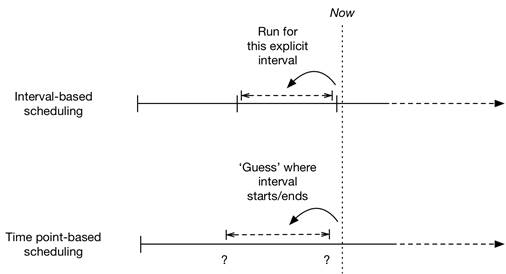
An advantage of using this interval-based approach, is that it is ideal for performing the type of incremental data processing that we saw in the previous sections, as we know exactly for which interval of time a task is executing for - the start and end of the corresponding interval. This is in stark contrast to for example a time point-based scheduling system such as cron, where we only know the current time for which our task is being executed. This means that, for example in cron, we either have to calculate or ‘guess’ where our previous execution left off, by for example assuming that the task is executing for the previous day (Figure 3.6).
Figure 3.6. Incremental processing in interval-based scheduling windows (e.g. Airflow) vs windows derived from time point based systems (e.g. cron). For incremental (data) processing, time is typically divided into discrete time intervals which are processed as soon as the corresponding interval passed. Interval-based scheduling approaches (such as Airflow) explicitly schedule tasks to run for each interval, whilst providing exact information to each task concerning the start and the end of the interval. In contrast, time point-based scheduling approaches only execute tasks at a given time, leaving it up to the task itself to determine for which incremental interval the task is executing.
Understanding that Airflow’s handling of time is built around schedule intervals also helps understand how execution dates are defined within Airflow. For example, say we have a DAG following a daily schedule interval and consider the corresponding interval that should process data for the day 2019-01-03. In Airflow, this interval will be run shortly after 2019-01-04 00:00:00, as at that point in time we know that we will no longer be receiving any new data for the day of 2019-01-03. Thinking back to our explanation of using execution dates in our tasks from the previous section, what do you think that the value of execution_date will be for this interval?
[2019-10-13 11:58:50,001] {python_sensor.py:78} INFO - Poking callable: <function wait_for_supermarket at 0x7fb2aa1937a0>
[2019-10-13 11:59:49,990] {python_sensor.py:78} INFO - Poking callable: <function wait_for_supermarket at 0x7fb2aa1937a0>
[2019-10-13 11:59:50,004] {taskinstance.py:1051} ERROR - Snap. Time is OUT.
Traceback (most recent call last):
  File "/usr/local/lib/python3.7/site-packages/airflow/models/taskinstance.py", line 926, in _run_raw_task
    result = task_copy.execute(context=context)
  File "/usr/local/lib/python3.7/site-packages/airflow/sensors/base_sensor_operator.py", line 116, in execute
    raise AirflowSensorTimeout('Snap. Time is OUT.')
airflow.exceptions.AirflowSensorTimeout: Snap. Time is OUT.
[2019-10-13 11:59:50,010] {taskinstance.py:1082} INFO - Marking task as FAILED.