concept CMIS Workbench in category apache chemistry

This is an excerpt from Manning's book CMIS and Apache Chemistry in Action.
The CMIS Workbench is a Java Swing application that we’ll use as a CMIS client to work with objects in the CMIS server. The CMIS Workbench was created using the OpenCMIS API and is typically used by developers who want a view into a CMIS repository that is based purely on the CMIS specification. For example, suppose you’re working with Microsoft SharePoint, which has a variety of ways to create, query, update, and delete content that resides within it, and you want to integrate your application with SharePoint using CMIS. You could use the CMIS Workbench to test some queries or inspect the data model. If you want to know if you can do something purely through CMIS, one test is to try to do it through the CMIS Workbench. If the CMIS Workbench can do it, you know you’ll be able to do it as part of your integration.
One of the key features of the CMIS Workbench, from both a “developer utility” perspective and a “let’s learn about CMIS” perspective, is its interactive Groovy console. The Groovy console is perfect for taking your first steps with CMIS.
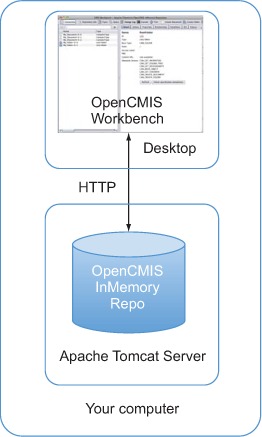
Figure 1.4. Your local CMIS development setup includes two components: the CMIS Workbench and the OpenCMIS InMemory Repository. This is all you’ll need for the examples in part 1 of this book.
1. If the CMIS Workbench isn’t running, run it as previously discussed.
2. If the CMIS Workbench isn’t displaying the login dialog box, click Connection in the upper-left corner.