concept item in category api

This is an excerpt from Manning's book Irresistible APIs: Designing web APIs that developers will love.
Once you’re using a protocol, it’s important to have a well-described format for the messages that are sent through that protocol. What does a request look like? What response can be expected? To help you understand what needs to be communicated via the transactions between client and server, the requests and responses being sent over HTTP, I’ll bring these questions back into the real world. To support the needs of a computer system, a RESTful web API must support creating, reading, updating, and deleting items on the platform. Figure 1.5 describes how a web API works, comparing it to a real-world resource (an iced tea ordered at a coffee shop).
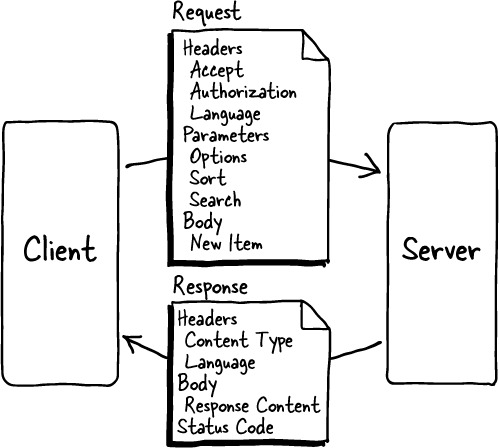
Figure 4.1. HTTP transaction between a client (application) and server (platform). The HTTP request will always be sent to a specific URL defining the resource; most requests will also have headers to add context to the request, along with parameters to refine the item itself. If the request is an update or create action, a body will be sent as well. The HTTP response always has a status code indicating the success or failure of the exchange, as well as headers describing the type and size of the content.
The next thing I do is specify how I want the iced tea (table 4.7). “Extra ice, unsweetened.” To do this with HTTP you’d use PUT, the verb that’s used to update an existing object in the database. The address used for this action is the one that was retrieved from the POST operation before. The Location information indicates that further operations on this specific order need to use the address returned by the create action. As you can see in table 4.7, the body content for this request includes the entire ordered item, including the information in the originally created order as well as the information you want to add. Sending the update with the body, as shown in table 4.7, will update the system’s version of your order to add the two new options. Note that sending an object that only had your changes (and not the original content) wouldn’t update the object correctly. PUT is a full update on the item; you need to build the entire object and PUT it to the system rather than try to make changes piecemeal. Another HTTP method, PATCH, can be used in this way, but most API servers don’t implement it, and using that kind of system requires a deep understanding of the data model.