concept library in category arduino

This is an excerpt from Manning's book Arduino in Action.
Table 7.8 lists the various functions in the library that you’ll use to move around on and draw to your display.
Table 7.8. The functions available in the GLCDks0108 library
Function
Description
Init(bool inverted) Initializes the library ClearScreen() Resets and clears everything on the display DrawBitmap(bitmap, int x, int y, color) Draws the provided bitmap image at the x,y location SelectFont(font) Switches to the fixed-width font provided PutChar(char c) Prints a char at the current position GotoXY(int x, int y) Moves position to x,y (top left is 0,0) CursorTo(int x, int y) Locates cursor for printing text PrintNumber(long n) Prints a number to the screen at the current position Puts(string t) Prints a text string at the current cursor position DrawLine(int x1, int y1, int x2, int y2, color) Draws a line DrawVertLine(int x, int y, int length, color) Draws a vertical line DrawHoriLine(int x, int y, int length, color) Draws a horizontal line DrawRect(int x, int y, int width, int height) Draws a rectangle InvertRect(int x, int y, int width, int height) Inverts pixels within given rectangle DrawRoundedRect(int x, int y, int width, int height, int radius, int color) Draws a rectangle with rounded corners FillRect(int x, int y, int width, int height, int color) Draws a filled rectangle DrawCircle(int x, int y, int radius, color) Draws a circle with the center at x,y SetDot(int x, int y, color) Fills a pixel at the specified location
In chapter 4 we covered software libraries and how they’re used to extend the basic functionality of the Arduino. Other chapters have provided examples of how using libraries in your own projects can easily extend their functionality.
When you’ve gained some experience in writing your own sketches there will come a time when you develop a sketch that you could reuse in future projects or that may be useful to the Arduino community. You can either keep the developed code in a sketch or split it out into a library. Splitting the sketch out into a library will probably make it more useful to other users.
This appendix will guide you through the anatomy of a library so that you can see what’s involved in writing your own.
The .cpp file contains the meat of the library. It includes the .h (header) file and fleshes out the functions declared in that file. The next listing shows the outline for our .cpp file.
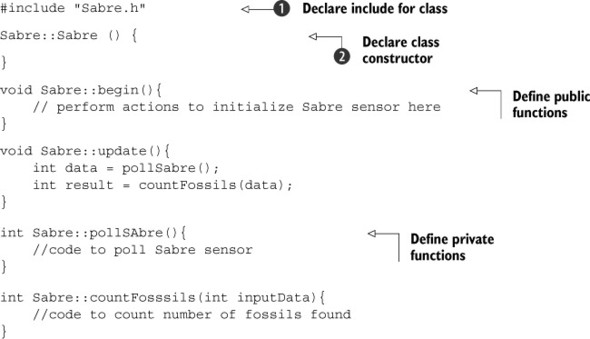
 before constructing the class
 . The public and private functions of the class then complete the library.