concept action in category asp.net

This is an excerpt from Manning's book ASP.NET Core in Action, Second Edition.
Figure 4.4 When executed, an action will invoke the appropriate methods in the application model.
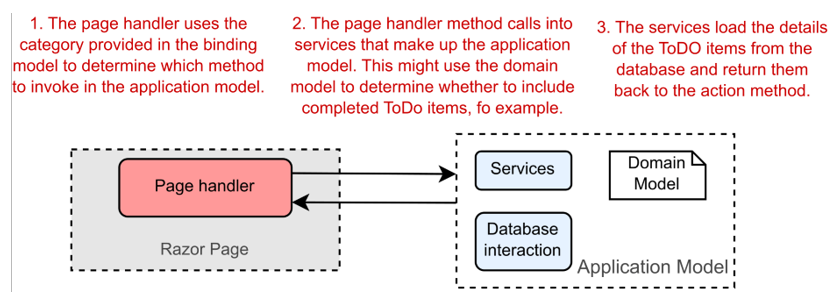
An action (or action method) is a method that runs in response to a request. An MVC controller is a class that contains a number of logically grouped action methods.
Figure 4.7 A complete MVC controller request for a category. The MVC controller pattern is almost identical to that of Razor Pages, shown in figure 4.6. The Controller is equivalent to a Razor Page, and the Action is equivalent to a page handler.
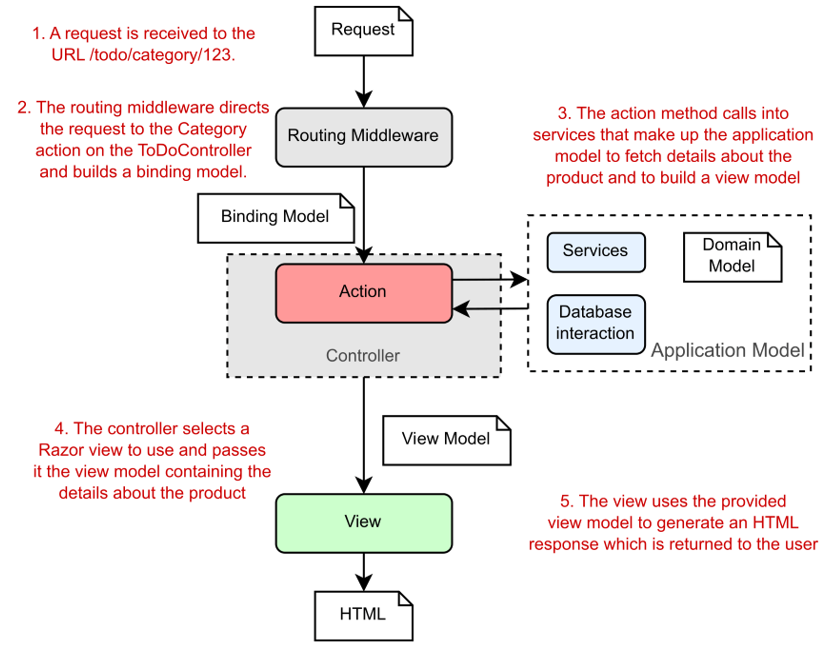
The listing below shows an example of how an MVC controller that provides the same functionality as the Razor Page in Listing 4.1 might look. In MVC, controllers are often used to aggregate similar actions together, so the controller in this case is called
ToDoController, as it would typically contain additional action methods for working with to-do items, such as actions to view a specific item, or to create a new one.
You can see the HTML markup that this template produces in listing 8.4. This Razor markup and the resulting HTML produces the results you saw in figure 8.4. You can see that each of the HTML elements with a Tag Helper has been customized in the output: the
<form>element has anactionattribute, the<input>elements have anidandnamebased on the name of the referenced property, and both the<input>and<span>havedata-*elements for validation.

This is an excerpt from Manning's book ASP.NET Core in Action.
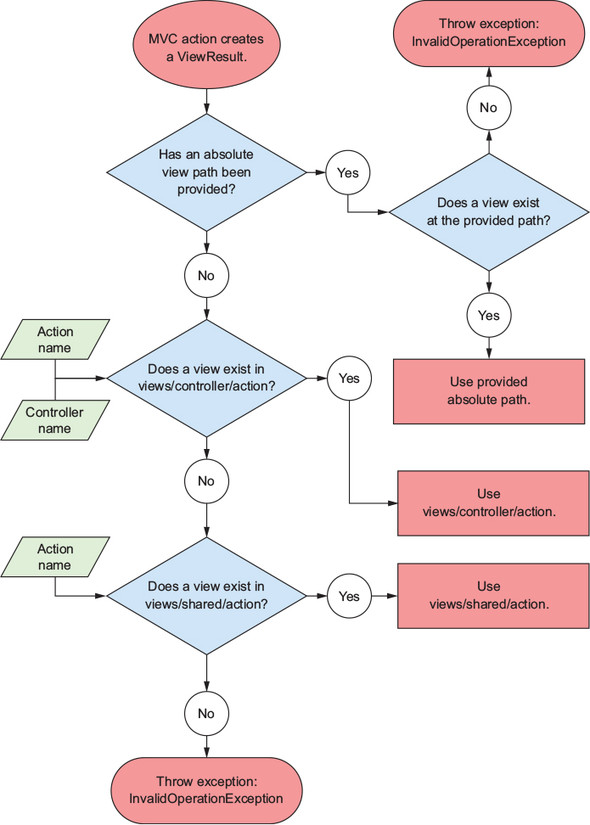
Figure 2.15. The algorithm used to locate view templates in ASP.NET Core when an action creates a ViewResult. If the ViewResult has been created using a specific path to a view, and a view exists at the path, then the view will be used. If not, the controller name and action name will be used to try and find the view. If that doesn’t exist, the Shared folder and action name will be used. If no view exists at any of the locations, an InvalidOperationException will be thrown.
One aspect that I glossed over was how to select an action to execute when you receive a request. What makes a request “appropriate” for a given action? The process of mapping a request to a given handler is called routing.
These route templates are global, so you define them in Startup.cs when adding the MvcMiddleware to your pipeline, as you’ll see in the next section. When routing an incoming URL, the middleware uses the full collection of defined conventional routes and attempts to determine the appropriate controller and action they correspond to.
For each request, the MvcMiddleware determines the action to execute by following the process set out in figure 5.3. For each defined route template, the router attempts to split the request’s URL into segments corresponding to the template.
Figure 5.3. Flow chart showing how the MvcMiddleware matches a URL against multiple routes to determine which action method to execute
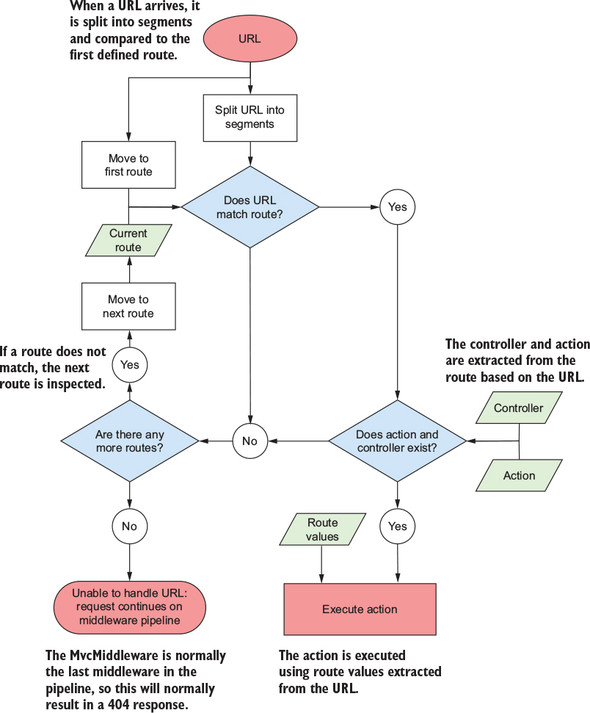
If the URL pattern matches, the router infers the controller and action from the URL. If this points to a valid action method, then routing is complete and the action method is executed. If the route template doesn’t match the URL, or the specified controller-action pair doesn’t exist, then the router moves on to the next defined template and attempts to match that, until no more routes are left.
The complex route template of figure 5.6 allows you to match a greater variety of URLs by making some parameters optional and providing a default for action. Table 5.2 shows some of the possible URLs this template would match, and the corresponding route values the router would create.
Table 5.2. URLs that would match the template of figure 5.6 and their corresponding route values
URL
Route values
api/product/view/3 controller=product, action=view, id = 3 api/product/view controller=product, action=view api/product controller=product, action=index api/customer/list controller=customer, action=list api/order controller=order, action=index api/order/edit/O-123 controller=order, action=edit, id = O-123 Note that there’s no way to specify a value for the optional id parameter without also specifying the action and controller parameters. You can’t put an optional parameter before a required parameter, as there would be no way of specifying the required parameter only. Imagine your route template had an optional controller parameter:
{controller?}/{action}Now try to think of a URL that would specify the action parameter, but not the controller. It can’t be done!
Listing 5.13 shows two ways to generate URLs from an ActionResult. The RedirectToAction method takes in action and controller names, as well as route parameters, and generates a URL in the same way as the Url.Action method. Similarly, the RedirectToRoute is equivalent to Url.RouteUrl.

This is an excerpt from Manning's book ASP.NET 4.0 in Practice.
ASP.NET MVC uses a different concept of page from what you might be used to. You have a more restricted link to the actions performed under the hood, and a page (meaning what you see when you’re browsing a site) is in fact called a view. We’re going to discuss this topic in more detail in chapter 7.
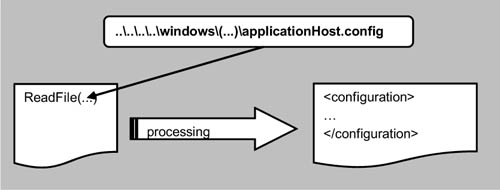
Path canonicalization is the corresponding threat for file access, as SQL injection is for SQL queries. Canonicalization is, in general, a process for converting data into a canonical (or standard) form. With respect to the path, it refers to the action that builds a path in a safe form. This process is shown in figure 10.9.

This is an excerpt from Manning's book ASP.NET MVC 2 in Action.
ASP.NET MVC 2 ships with a filter attribute called AuthorizeAttribute that provides out-of-the-box authentication and authorization. Developers can apply the attribute to actions to restrict access to them. If the user isn’t permitted to access the action, the AuthorizeAttribute will transmit an HTTP status code of 401 Unauthorized to the browser, indicating that the request has been refused. Applications using ASP.NET’s forms authentication mechanism and with a login page specified in Web.config will then redirect the browser to the login page, and users may only proceed once they have been authenticated.
If multiple AuthorizeAttributes are applied to an action, all checks occur and the user must be authorized by all of them. AuthorizeAttribute implements a special interface called IAuthorization-Filter. When applied to an action, an IAuthorizationFilter will execute before any other action filters, and before the normal result. Listing 11.4 shows the declaration of IAuthorizationFilter. Listing 11.4. Declaring the IAuthorizationFilter
public interface IAuthorizationFilter { void OnAuthorization(AuthorizationContext filterContext); }If you wanted to create your own filter attribute for authentication or authorization, you could implement the IAuthorizationFilter interface as an action filter and apply it to an action.
This is an excerpt from Manning's book ASP.NET MVC in Action with MvcContrib, NHibernate, and More.
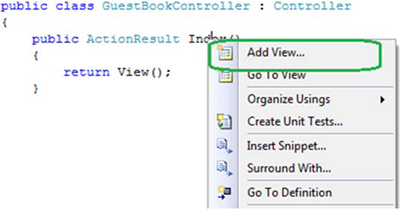
Next, add a view to the project inside /Views/Helloworld3. You can use the New Item dialog for the project and select the MVC View Page; a quicker way is to use the context menu (right click) off of the action and select Add View... as shown in figure 1.9. This tool will create a view with the proper name inside the proper folder. Your project should now look similar to figure 1.8. Our new view, Index.aspx, resides in the HelloWorld3 folder.
Listing 2.1. A route that maps the desired URL to the proper controller and action
MvcRoute.MappUrl("{conferenceKey}/{controller}/{action}") .WithDefaults(new {controller = "Conference", action = "index"}) .WithConstraints(new { conferenceKey = new ConferenceKeyCannotBeAControllerNameConstraint(), controller = @"schedule|session|timeslot|track|attendee |conference|speaker|admin|proposal|user|sponsor" }) .AddWithName("conferenceDefault", routes) .RouteHandler = new DomainNameRouteHandler();
The focus of the Model-View-Controller pattern is the controller. With this pattern, every request is handled by a controller and rendered by a view. Without the controller, presentation and business logic would move to the view, as we have seen with Web Forms. With the ASP.NET MVC Framework, every request routes to a controller, which is simply a class that implements the IController interface. Microsoft provides the base class System.Web.Mvc.Controller to make creating a controller easy. The controller base class you choose is not crucial because most request processing goes into executing the ActionResult, which is the type that each action returns.
An action is a method that handles a particular request. This method can take no parameters or many, but by the time the action method finishes executing, there ought to be one or many objects ready to be sent to the view, and the name of the view should be selected if the view does not follow the convention of having the same name as the action. Beyond that, the developer is in complete control regarding how to implement a controller and its actions. In chapter 1 we covered using the IController interface directly for controllers that need only one action. This chapter will explore controllers that use many actions and inherit from the System.Web.Mvc.Controller base class. The meat of the controller is the action.


This is an excerpt from Manning's book ASP.NET AJAX in Action.
To see this in action, visit the maps page on the Windows Live site at http://local.live.com (see figure 1.2). Notice the interactive map and how clicking and dragging the map updates the contents on the page without causing a full page refresh to occur. The tiles for the map are retrieved in the background via the XMLHttpRequest object; the user is granted continuous interaction with the application in the process. Take some time to discover what the site has to offer, and note how fluid and responsive the page actions appear. Using the ASP.NET AJAX framework, these are the types of intuitive and interactive applications that you’ll build throughout this book.

This is an excerpt from Manning's book ASP.Net 2.0 Web Parts in Action: Building Dynamic Web Portals.
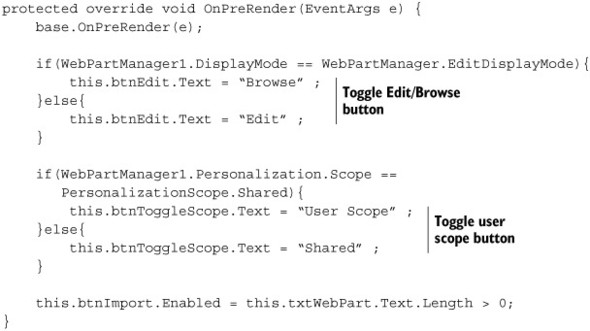
We also saw the three common ingredients of modern portals in action; that is, web parts, zones, and personalization. Of course there is still much to learn, but it’s instructive to pause and reflect on just how much has been achieved with less than a dozen lines of C# code.