concept bind model in category asp.net

This is an excerpt from Manning's book ASP.NET Core in Action, Second Edition.
Once a page handler is selected, the binding model (if applicable) is generated. This model is built based on the incoming request, the properties of the
PageModelmarked for binding, and the method parameters required by the page handler, as shown in figure 4.3. A binding model is normally one or more standard C# objects, with properties that map to the requested data. We’ll look at binding models in detail in chapter 6.
Figure 4.3 Routing a request to a controller and building a binding model. A request to the
/category/SimpleURL results in theCategoryModel.OnGetpage handler being executed, passing in a populated binding model,category.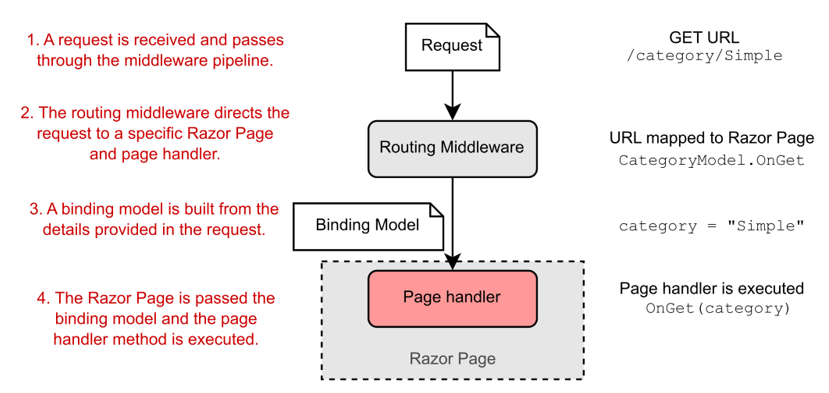
Binding model—The binding model is all the information that’s provided by the user when making a request, as well as additional contextual data. This includes things like route parameters parsed from the URL, the query string, and form or JSON data in the request body. The binding model itself is one or more POCO objects that you define. Binding models in Razor Pages are typically defined by creating a public property on the page’s PageModeland decorating it with the[BindProperty]attribute. They can also be passed to a page handler as parameters.
For this example, the binding model would include the name of the category,open, and the username,Andrew. The Razor Pages infrastructure inspects the binding model before the page handler executes to check whether the provided values are valid, though the page handler will execute even if they’re not, as you’ll see when we discuss validation in section 6.3

This is an excerpt from Manning's book ASP.NET Core in Action.
Once an action method is selected, the binding model (if applicable) is generated, based on the incoming request and the method parameters required by the action method, as shown in figure 4.4. A binding model is normally a standard class, with properties that map to the requested data. We’ll look at binding models in detail in chapter 6.
A binding model is an object that acts as a “container” for the data provided in a request that’s required by an action method.
Figure 4.4. Routing a request to a controller and building a binding model. A request to the /todo/list/Simple/Andrew URL results in the ListCategory action being executed, passing in a populated binding model.
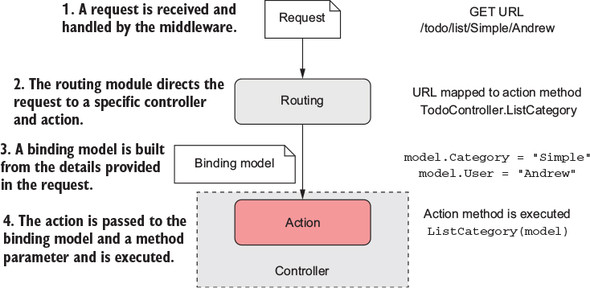
In this case, the binding model contains two properties: Category, which is “bound” to the "Simple" value, and the User property, which is bound to the "Andrew" value. These values are provided in the request URL’s path and are used to populate a binding model of the TodoModel type.
Listing 6.5. Adding DataAnnotations to a binding model to provide metadata
Public class UserBindingModel { [Required] #1 [StringLength(100)] #2 [Display(Name = "Your name")] #3 public string FirstName { get; set; } [Required] #1 [StringLength(100)] #4 [Display(Name = "Last name")] #3 public string LastName { get; set; } [Required] #1 [EmailAddress] #5 public string Email { get; set; } [Phone] [Display(Name = "Phone number")] #3 public string PhoneNumber { get; set; } } #1 Values marked Required must be provided. #2 The StringLengthAttribute sets the maximum length for the property. #3 Customizes the name used to describe the property #4 The StringLengthAttribute sets the maximum length for the property. #5 Validates the value of Email is a valid email address !@%STYLE%@! {"css":"{\"css\": \"font-weight: bold;\"}","target":"[[{\"line\":2,\"ch\":50},{\"line\":2,\"ch\":52}],[{\"line\":7,\"ch\":50},{\"line\":7,\"ch\":52}],[{\"line\":12,\"ch\":50},{\"line\":12,\"ch\":52}],[{\"line\":21,\"ch\":0},{\"line\":21,\"ch\":2}],[{\"line\":3,\"ch\":50},{\"line\":3,\"ch\":52}],[{\"line\":22,\"ch\":0},{\"line\":22,\"ch\":2}],[{\"line\":4,\"ch\":50},{\"line\":4,\"ch\":52}],[{\"line\":9,\"ch\":50},{\"line\":9,\"ch\":52}],[{\"line\":17,\"ch\":50},{\"line\":17,\"ch\":52}],[{\"line\":23,\"ch\":0},{\"line\":23,\"ch\":2}],[{\"line\":2,\"ch\":50},{\"line\":2,\"ch\":52}],[{\"line\":7,\"ch\":50},{\"line\":7,\"ch\":52}],[{\"line\":12,\"ch\":50},{\"line\":12,\"ch\":52}],[{\"line\":21,\"ch\":0},{\"line\":21,\"ch\":2}],[{\"line\":8,\"ch\":50},{\"line\":8,\"ch\":52}],[{\"line\":24,\"ch\":0},{\"line\":24,\"ch\":2}],[{\"line\":4,\"ch\":50},{\"line\":4,\"ch\":52}],[{\"line\":9,\"ch\":50},{\"line\":9,\"ch\":52}],[{\"line\":17,\"ch\":50},{\"line\":17,\"ch\":52}],[{\"line\":23,\"ch\":0},{\"line\":23,\"ch\":2}],[{\"line\":2,\"ch\":50},{\"line\":2,\"ch\":52}],[{\"line\":7,\"ch\":50},{\"line\":7,\"ch\":52}],[{\"line\":12,\"ch\":50},{\"line\":12,\"ch\":52}],[{\"line\":21,\"ch\":0},{\"line\":21,\"ch\":2}],[{\"line\":13,\"ch\":50},{\"line\":13,\"ch\":52}],[{\"line\":25,\"ch\":0},{\"line\":25,\"ch\":2}],[{\"line\":4,\"ch\":50},{\"line\":4,\"ch\":52}],[{\"line\":9,\"ch\":50},{\"line\":9,\"ch\":52}],[{\"line\":17,\"ch\":50},{\"line\":17,\"ch\":52}],[{\"line\":23,\"ch\":0},{\"line\":23,\"ch\":2}]]"} !@%STYLE%@!