concept change in category asp.net

This is an excerpt from Manning's book ASP.NET Core in Action.
At the heart of the changes is the philosophy that ASP.NET should be able to hold its head high when measured against other modern frameworks, but that existing .NET developers should continue to be left with a sense of familiarity.
When you deploy an app, you can normally delete the old code/executable and replace it with the new code—job done. If you need to roll back a change, delete that new code and deploy an old version of the app.
You’ll encapsulate these three steps in a method on RecipeService, UpdateRecipe, which takes UpdateRecipeCommand, containing the changes to make to the Recipe entity.
Listing 12.9. Updating an existing entity with EF Core
public void UpdateRecipe(UpdateRecipeCommand cmd) { var recipe = _context.Recipes.Find(cmd.Id); #1 if(recipe == null) { #2 throw new Exception("Unable to find the recipe"); #2 } #2 UpdateRecipe(recipe, cmd); #3 _context.SaveChanges(); #4 } static void UpdateRecipe(Recipe recipe, UpdateRecipeCommand cmd) #5 { #5 recipe.Name = cmd.Name; #5 recipe.TimeToCook = #5 new TimeSpan(cmd.TimeToCookHrs, cmd.TimeToCookMins, 0); #5 recipe.Method = cmd.Method; #5 recipe.IsVegetarian = cmd.IsVegetarian; #5 recipe.IsVegan = cmd.IsVegan; #5 } #5 #1 Find is exposed directly by Recipes and simplifies reading an entity by id. #2 If an invalid id is provided, recipe will be null. #3 Set the new values on the Recipe entity. #4 Execute the SQL to save the changes to the database. #5 A helper method for setting the new properties on the Recipe entity !@%STYLE%@! {"css":"{\"css\": \"font-weight: bold;\"}","target":"[[{\"line\":2,\"ch\":70},{\"line\":2,\"ch\":72}],[{\"line\":21,\"ch\":0},{\"line\":21,\"ch\":2}],[{\"line\":3,\"ch\":70},{\"line\":3,\"ch\":72}],[{\"line\":4,\"ch\":70},{\"line\":4,\"ch\":72}],[{\"line\":5,\"ch\":70},{\"line\":5,\"ch\":72}],[{\"line\":22,\"ch\":0},{\"line\":22,\"ch\":2}],[{\"line\":3,\"ch\":70},{\"line\":3,\"ch\":72}],[{\"line\":4,\"ch\":70},{\"line\":4,\"ch\":72}],[{\"line\":5,\"ch\":70},{\"line\":5,\"ch\":72}],[{\"line\":22,\"ch\":0},{\"line\":22,\"ch\":2}],[{\"line\":3,\"ch\":70},{\"line\":3,\"ch\":72}],[{\"line\":4,\"ch\":70},{\"line\":4,\"ch\":72}],[{\"line\":5,\"ch\":70},{\"line\":5,\"ch\":72}],[{\"line\":22,\"ch\":0},{\"line\":22,\"ch\":2}],[{\"line\":7,\"ch\":70},{\"line\":7,\"ch\":72}],[{\"line\":23,\"ch\":0},{\"line\":23,\"ch\":2}],[{\"line\":8,\"ch\":70},{\"line\":8,\"ch\":72}],[{\"line\":24,\"ch\":0},{\"line\":24,\"ch\":2}],[{\"line\":11,\"ch\":70},{\"line\":11,\"ch\":72}],[{\"line\":12,\"ch\":70},{\"line\":12,\"ch\":72}],[{\"line\":13,\"ch\":70},{\"line\":13,\"ch\":72}],[{\"line\":14,\"ch\":70},{\"line\":14,\"ch\":72}],[{\"line\":15,\"ch\":70},{\"line\":15,\"ch\":72}],[{\"line\":16,\"ch\":70},{\"line\":16,\"ch\":72}],[{\"line\":17,\"ch\":70},{\"line\":17,\"ch\":72}],[{\"line\":18,\"ch\":70},{\"line\":18,\"ch\":72}],[{\"line\":19,\"ch\":70},{\"line\":19,\"ch\":72}],[{\"line\":25,\"ch\":0},{\"line\":25,\"ch\":2}],[{\"line\":11,\"ch\":70},{\"line\":11,\"ch\":72}],[{\"line\":12,\"ch\":70},{\"line\":12,\"ch\":72}],[{\"line\":13,\"ch\":70},{\"line\":13,\"ch\":72}],[{\"line\":14,\"ch\":70},{\"line\":14,\"ch\":72}],[{\"line\":15,\"ch\":70},{\"line\":15,\"ch\":72}],[{\"line\":16,\"ch\":70},{\"line\":16,\"ch\":72}],[{\"line\":17,\"ch\":70},{\"line\":17,\"ch\":72}],[{\"line\":18,\"ch\":70},{\"line\":18,\"ch\":72}],[{\"line\":19,\"ch\":70},{\"line\":19,\"ch\":72}],[{\"line\":25,\"ch\":0},{\"line\":25,\"ch\":2}],[{\"line\":11,\"ch\":70},{\"line\":11,\"ch\":72}],[{\"line\":12,\"ch\":70},{\"line\":12,\"ch\":72}],[{\"line\":13,\"ch\":70},{\"line\":13,\"ch\":72}],[{\"line\":14,\"ch\":70},{\"line\":14,\"ch\":72}],[{\"line\":15,\"ch\":70},{\"line\":15,\"ch\":72}],[{\"line\":16,\"ch\":70},{\"line\":16,\"ch\":72}],[{\"line\":17,\"ch\":70},{\"line\":17,\"ch\":72}],[{\"line\":18,\"ch\":70},{\"line\":18,\"ch\":72}],[{\"line\":19,\"ch\":70},{\"line\":19,\"ch\":72}],[{\"line\":25,\"ch\":0},{\"line\":25,\"ch\":2}],[{\"line\":11,\"ch\":70},{\"line\":11,\"ch\":72}],[{\"line\":12,\"ch\":70},{\"line\":12,\"ch\":72}],[{\"line\":13,\"ch\":70},{\"line\":13,\"ch\":72}],[{\"line\":14,\"ch\":70},{\"line\":14,\"ch\":72}],[{\"line\":15,\"ch\":70},{\"line\":15,\"ch\":72}],[{\"line\":16,\"ch\":70},{\"line\":16,\"ch\":72}],[{\"line\":17,\"ch\":70},{\"line\":17,\"ch\":72}],[{\"line\":18,\"ch\":70},{\"line\":18,\"ch\":72}],[{\"line\":19,\"ch\":70},{\"line\":19,\"ch\":72}],[{\"line\":25,\"ch\":0},{\"line\":25,\"ch\":2}],[{\"line\":11,\"ch\":70},{\"line\":11,\"ch\":72}],[{\"line\":12,\"ch\":70},{\"line\":12,\"ch\":72}],[{\"line\":13,\"ch\":70},{\"line\":13,\"ch\":72}],[{\"line\":14,\"ch\":70},{\"line\":14,\"ch\":72}],[{\"line\":15,\"ch\":70},{\"line\":15,\"ch\":72}],[{\"line\":16,\"ch\":70},{\"line\":16,\"ch\":72}],[{\"line\":17,\"ch\":70},{\"line\":17,\"ch\":72}],[{\"line\":18,\"ch\":70},{\"line\":18,\"ch\":72}],[{\"line\":19,\"ch\":70},{\"line\":19,\"ch\":72}],[{\"line\":25,\"ch\":0},{\"line\":25,\"ch\":2}],[{\"line\":11,\"ch\":70},{\"line\":11,\"ch\":72}],[{\"line\":12,\"ch\":70},{\"line\":12,\"ch\":72}],[{\"line\":13,\"ch\":70},{\"line\":13,\"ch\":72}],[{\"line\":14,\"ch\":70},{\"line\":14,\"ch\":72}],[{\"line\":15,\"ch\":70},{\"line\":15,\"ch\":72}],[{\"line\":16,\"ch\":70},{\"line\":16,\"ch\":72}],[{\"line\":17,\"ch\":70},{\"line\":17,\"ch\":72}],[{\"line\":18,\"ch\":70},{\"line\":18,\"ch\":72}],[{\"line\":19,\"ch\":70},{\"line\":19,\"ch\":72}],[{\"line\":25,\"ch\":0},{\"line\":25,\"ch\":2}],[{\"line\":11,\"ch\":70},{\"line\":11,\"ch\":72}],[{\"line\":12,\"ch\":70},{\"line\":12,\"ch\":72}],[{\"line\":13,\"ch\":70},{\"line\":13,\"ch\":72}],[{\"line\":14,\"ch\":70},{\"line\":14,\"ch\":72}],[{\"line\":15,\"ch\":70},{\"line\":15,\"ch\":72}],[{\"line\":16,\"ch\":70},{\"line\":16,\"ch\":72}],[{\"line\":17,\"ch\":70},{\"line\":17,\"ch\":72}],[{\"line\":18,\"ch\":70},{\"line\":18,\"ch\":72}],[{\"line\":19,\"ch\":70},{\"line\":19,\"ch\":72}],[{\"line\":25,\"ch\":0},{\"line\":25,\"ch\":2}],[{\"line\":11,\"ch\":70},{\"line\":11,\"ch\":72}],[{\"line\":12,\"ch\":70},{\"line\":12,\"ch\":72}],[{\"line\":13,\"ch\":70},{\"line\":13,\"ch\":72}],[{\"line\":14,\"ch\":70},{\"line\":14,\"ch\":72}],[{\"line\":15,\"ch\":70},{\"line\":15,\"ch\":72}],[{\"line\":16,\"ch\":70},{\"line\":16,\"ch\":72}],[{\"line\":17,\"ch\":70},{\"line\":17,\"ch\":72}],[{\"line\":18,\"ch\":70},{\"line\":18,\"ch\":72}],[{\"line\":19,\"ch\":70},{\"line\":19,\"ch\":72}],[{\"line\":25,\"ch\":0},{\"line\":25,\"ch\":2}],[{\"line\":11,\"ch\":70},{\"line\":11,\"ch\":72}],[{\"line\":12,\"ch\":70},{\"line\":12,\"ch\":72}],[{\"line\":13,\"ch\":70},{\"line\":13,\"ch\":72}],[{\"line\":14,\"ch\":70},{\"line\":14,\"ch\":72}],[{\"line\":15,\"ch\":70},{\"line\":15,\"ch\":72}],[{\"line\":16,\"ch\":70},{\"line\":16,\"ch\":72}],[{\"line\":17,\"ch\":70},{\"line\":17,\"ch\":72}],[{\"line\":18,\"ch\":70},{\"line\":18,\"ch\":72}],[{\"line\":19,\"ch\":70},{\"line\":19,\"ch\":72}],[{\"line\":25,\"ch\":0},{\"line\":25,\"ch\":2}]]"} !@%STYLE%@!

This is an excerpt from Manning's book ASP.Net 2.0 Web Parts in Action: Building Dynamic Web Portals.
This section opens up for you a new career—and you were ready for a change, weren’t you? You’ve just been hired as a web application developer for Adventure Works Cycles. The section introduces you to the Adventure Works Cycles Company and its major departments, and to the database you will be working with.
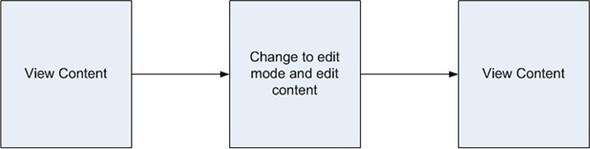
To add editing approval capabilities to our own portal we must find a way to create two versions of each page: one version would contain the approved content that is publicly visible, while the other version would contain changes awaiting approval. Figure 8.3 shows the editing process in our portal as it currently stands when a user designs or edits the web parts.
Figure 8.3 shows that users are able to view web pages and change them into edit mode to make changes to the personalization data. When the edits have been made, the user can then save the page to update the content. This is in effect the same action we’ve been taking throughout this book whenever we’ve edited a web part and clicked Save to have those changes persisted.
The user first makes changes to the personalization content by switching a page into edit mode; this is indicated by the box in the top right corner of figure 8.4.
When the user begins the editing process, a second version of the personalization data is created for the page to store those changes. The box in the middle of the top row shows us that when the user saves his edits, a second version of the page is created to store those changes. In the third box we see the version of the page that has the changes is not visible to ordinary viewers of the page, and that the original approved version of the personalization data is loaded into the page. To approve the pending changes a moderator can request that the unapproved version of personalization data again be loaded into the page so that they can view the edits made to the page and optionally accept or decline those changes. The final box in the figure shows that after the moderator has approved the changes, only one version of the data exists and that version is visible to all visitors to the portal.
Now that we are able to load revision data, we must also find a way to ensure it is correctly saved. When performing the save, we need to include logic, such as a check to determine whether the save operation is due to a user who is editing content or whether the save is the result of a moderator approving the content. We determine whether or not the user is committing changes by checking a custom property of the PortalWebPartManager called CommittingChanges; this property is set from the user interface layer when an administrator performs a commit operation. The code for the CommittingChanges property is shown in listing 8.3.
Listing 8.3. Adding a CommitChanges method to our WebPartManager allows us to flag that personalization data has changes.
private bool _committingChanges = false; public bool CommittingChanges { get { return _committingChanges; } set { _committingChanges = value; } } public void CommitChanges() { this.CommittingChanges = true; SetPersonalization Dirty(); }
With these changes in place, our portal is now ready for users to begin making changes to the content that will be hidden from public view until they are approved. The only code needing to be created is the logic that ensures the Approve Content button is only visible to users within specific access rights—presumably users with content management rights. In order to keep this simple, I haven’t added that code to our portal solution.
When you run the page and click on the Approve Content Changes button, you will see that the Common Tasks area looks as it did in figure 8.6 and that the catalog zone is displayed. While the page is in revise mode, make some changes to the content—such as adding or removing web parts or moving them around—and then click on End Revising Content to see that the changes are not visible in normal viewing mode. Place the page into revise mode again so you can approve the changes, and after doing so click on the End Revising Content button once again and you will see that the changes are now visible to all portal users.