concept client in category asp.net

This is an excerpt from Manning's book ASP.NET Core in Action.
With this in mind, all that’s left to demonstrate is how to generate the HTML that you send to the client.
Once the SPA is loaded, communication with a server still occurs over HTTP, but instead of sending HTML directly to the browser in response to requests, the server-side application sends data (normally in a format such as JSON or XML) to the client-side application. The SPA then parses the data and generates the appropriate HTML to show to a user, as shown in figure 9.2. The server-side application endpoint that the client communicates with is sometimes called a Web API.
Content negotiation is where a client says which types of data it can accept using the accept header and the server picks the best one it can handle. Generally speaking, this works as you’d hope: the server formats the data using a type the client can understand.
Listing 20.13. Creating an integration test with TestServer
public class StatusMiddlewareTests { [Fact] public async Task StatusMiddlewareReturnsPong() { var hostBuilder = new WebHostBuilder() #1 .Configure(app => #1 { #1 app.UseMiddleware<StatusMiddleware>(); #1 }); #1 using (var server = new TestServer(hostBuilder)) #2 { HttpClient client = server.CreateClient(); #3 var response = await client.GetAsync("/ping"); #4 response.EnsureSuccessStatusCode(); #5 var content = await response.Content.ReadAsStringAsync(); #6 Assert.Equal("pong", content); #6 } } } #1 Configures a WebHostBuilder that defines your app #2 Creates an instance of the TestServer, passing in the WebHostBuilder app #3 Creates an HttpClient, or you can interact directly with the server object #4 Makes an in-memory request, which is handled by the app as normal. #5 Verifies the response was a success (2xx) status code #6 Reads the body content and verifies that it contained “pong” !@%STYLE%@! {"css":"{\"css\": \"font-weight: bold;\"}","target":"[[{\"line\":5,\"ch\":72},{\"line\":5,\"ch\":74}],[{\"line\":6,\"ch\":72},{\"line\":6,\"ch\":74}],[{\"line\":7,\"ch\":72},{\"line\":7,\"ch\":74}],[{\"line\":8,\"ch\":72},{\"line\":8,\"ch\":74}],[{\"line\":9,\"ch\":72},{\"line\":9,\"ch\":74}],[{\"line\":24,\"ch\":0},{\"line\":24,\"ch\":2}],[{\"line\":5,\"ch\":72},{\"line\":5,\"ch\":74}],[{\"line\":6,\"ch\":72},{\"line\":6,\"ch\":74}],[{\"line\":7,\"ch\":72},{\"line\":7,\"ch\":74}],[{\"line\":8,\"ch\":72},{\"line\":8,\"ch\":74}],[{\"line\":9,\"ch\":72},{\"line\":9,\"ch\":74}],[{\"line\":24,\"ch\":0},{\"line\":24,\"ch\":2}],[{\"line\":5,\"ch\":72},{\"line\":5,\"ch\":74}],[{\"line\":6,\"ch\":72},{\"line\":6,\"ch\":74}],[{\"line\":7,\"ch\":72},{\"line\":7,\"ch\":74}],[{\"line\":8,\"ch\":72},{\"line\":8,\"ch\":74}],[{\"line\":9,\"ch\":72},{\"line\":9,\"ch\":74}],[{\"line\":24,\"ch\":0},{\"line\":24,\"ch\":2}],[{\"line\":5,\"ch\":72},{\"line\":5,\"ch\":74}],[{\"line\":6,\"ch\":72},{\"line\":6,\"ch\":74}],[{\"line\":7,\"ch\":72},{\"line\":7,\"ch\":74}],[{\"line\":8,\"ch\":72},{\"line\":8,\"ch\":74}],[{\"line\":9,\"ch\":72},{\"line\":9,\"ch\":74}],[{\"line\":24,\"ch\":0},{\"line\":24,\"ch\":2}],[{\"line\":5,\"ch\":72},{\"line\":5,\"ch\":74}],[{\"line\":6,\"ch\":72},{\"line\":6,\"ch\":74}],[{\"line\":7,\"ch\":72},{\"line\":7,\"ch\":74}],[{\"line\":8,\"ch\":72},{\"line\":8,\"ch\":74}],[{\"line\":9,\"ch\":72},{\"line\":9,\"ch\":74}],[{\"line\":24,\"ch\":0},{\"line\":24,\"ch\":2}],[{\"line\":11,\"ch\":72},{\"line\":11,\"ch\":74}],[{\"line\":25,\"ch\":0},{\"line\":25,\"ch\":2}],[{\"line\":13,\"ch\":72},{\"line\":13,\"ch\":74}],[{\"line\":26,\"ch\":0},{\"line\":26,\"ch\":2}],[{\"line\":15,\"ch\":72},{\"line\":15,\"ch\":74}],[{\"line\":27,\"ch\":0},{\"line\":27,\"ch\":2}],[{\"line\":17,\"ch\":72},{\"line\":17,\"ch\":74}],[{\"line\":28,\"ch\":0},{\"line\":28,\"ch\":2}],[{\"line\":18,\"ch\":72},{\"line\":18,\"ch\":74}],[{\"line\":19,\"ch\":72},{\"line\":19,\"ch\":74}],[{\"line\":29,\"ch\":0},{\"line\":29,\"ch\":2}],[{\"line\":18,\"ch\":72},{\"line\":18,\"ch\":74}],[{\"line\":19,\"ch\":72},{\"line\":19,\"ch\":74}],[{\"line\":29,\"ch\":0},{\"line\":29,\"ch\":2}]]"} !@%STYLE%@!

This is an excerpt from Manning's book ASP.NET 4.0 in Practice.
ASP.NET handles the state for you, using a mechanism called ViewState. Both the page and the controls are able to persist their state during the iteration between client and server (called PostBack). A PostBack is a post of the form back to the server.
Reprising the previous example, the server doesn’t need to reprocess the entire page and resend HTML to the client just to see a number. You can simply send an invisible command to the server, which then calculates only the amount of the order and returns it to the client; the client then shows the amount beside the order. Figure 12.2 show this flow.
Figure 12.2. The interaction between the user and the server in Ajax style. The user requests a page and receives HTML. Then the user performs an action, and the browser sends only necessary data to the server. The server processes this data and then sends to the client only the information needed—not the entire page. It’s the client’s duty to show this data to the user.
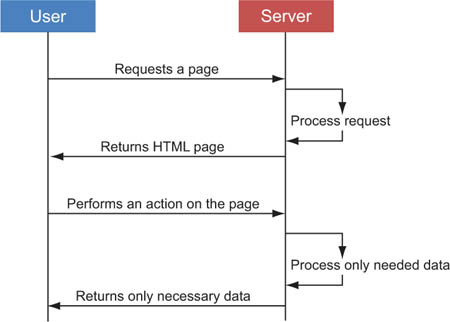
Figure 12.2. The interaction between the user and the server in Ajax style. The user requests a page and receives HTML. Then the user performs an action, and the browser sends only necessary data to the server. The server processes this data and then sends to the client only the information needed—not the entire page. It’s the client’s duty to show this data to the user.

This is an excerpt from Manning's book ASP.NET AJAX in Action.
Normally, a user action such as clicking a button on a form invokes an HTTP request back to the web server. The server then processes the request, possibly doing some calculations or performing a few database operations; and then returns back to the client a whole new page to render. Technically, this makes a lot of sense—web pages are stateless by nature, and because all the logic about the application typically resides on the server, the browser is just used to display the interface. The server goes through the entire page lifecycle again and returns to the browser the HTML, CSS, and any other resources it needs to refresh the page. Unfortunately, this doesn’t present the user with a desirable experience. Instead, they’re exposed to a stop-start-stop pattern where they temporarily (and unwillingly) lose interaction with the page and are left waiting for it to be updated.
A website is a perfect example of the client/server architecture. Each instance of a browser (the client) can send requests to a server for data and content. When the client initiates a request to a known remote server to execute a procedure or subroutine, it’s often called a remote procedure call (RPC). Working closely with ASP.NET Web Services, the ASP.NET AJAX framework significantly simplifies the effort it takes to execute RPC patterns from JavaScript. In simpler terms, the framework makes it easy for you to communicate with Web Services from JavaScript.

By default, the ASP.NET Web Services used by the Ajax framework use the JSON (see chapter 3) data format for the transfer of data between the client and server. This means the value is first serialized with a JSON serializer before it’s written in the response’s payload. One of the key reasons JSON is used is because of its natural integration with JavaScript and its lightweight nature. (You can convert JSON into a JavaScript object by passing it into the eval method.)
Listing 5.9. Adding support for the Employee class on the client using GenerateScriptType
[ScriptService] [GenerateScriptType(typeof(Employee))] [WebService(Namespace = "http://aspnetajaxinaction.com/")] [WebServiceBinding(ConformsTo = WsiProfiles.BasicProfile1_1)] public class StarbucksService : System.Web.Services.WebService { ...This is all you need to do to provide support for instantiating a server-side object on the client. To prove that this class can be created and manipulated from JavaScript, add the following lines of markup and script to the page: