concept command in category asp.net

This is an excerpt from Manning's book ASP.NET 4.0 in Practice.
ASP.NET is part of .NET Framework, so it takes full advantage of the object-oriented programming (OOP) capabilities offered by the framework itself. OOP lets you think in terms of objects and program their interactions. Because we as humans think in terms of objects in real life, OOP is one of the easiest programming paradigms to understand. When you create a web page using ASP.NET, you’re creating an object with behaviors (the page’s events), commands (methods), and state (objects instantiated).
Throughout this book, we’ve used Entity Framework to access data stored in a database. Although it’s recommended, Entity Framework isn’t the only choice for retrieving data. A good alternative is to use ADO.NET. Entity Framework itself leverages this component. ADO.NET is easy to use, but you have to manually handle the connection to the database, the command to execute queries, and the transaction to execute multiple update commands. Finally, data isn’t returned as objects but as a generic-purpose container. All these features make ADO.NET simple but extremely code intensive. That’s why Entity Framework is the recommended approach.
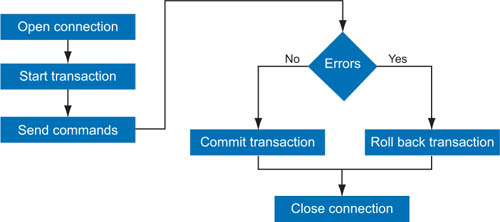
When you need to save data into the database, the process is identical to what we did before. You open a connection, execute the command, and close the connection. The only optional variation is that if you have to send more than one command, you have to use a transaction to ensure an all-or-nothing update. If a command goes wrong, you can roll back the transaction and invalidate all previous commands; if everything works fine, you can commit the transaction so that all changes made by the commands become persistent. Figure B.2 shows this workflow.