concept container in category asp.net

This is an excerpt from Manning's book ASP.NET Core in Action.
This is where containers come in. Containers are far more lightweight and don’t have the overhead of virtual machines. They’re built in a series of layers and don’t require you to boot a new operating system when starting a new one. That means they’re quick to start and are great for quick provisioning. Containers, and Docker in particular, are quickly becoming the go-to platform for building large, scalable systems.
Containers have never been a particularly attractive option for ASP.NET applications, but with ASP.NET Core, .NET Core, and Docker for Windows, that’s all changing. A lightweight ASP.NET Core application running on the cross-platform .NET Core framework is perfect for thin container deployments. You can learn more about your deployment options in chapter 16.

Instead of providing a single instance that the container will always use, you can also provide a function that the container will invoke when it needs an instance of the type, shown in figure 10.9.
Figure 10.9. You can register a function with the DI container that will be invoked whenever a new instance of a service is required.
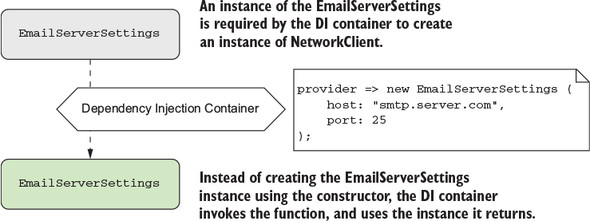
The easiest way to do this is to use a lambda function (an anonymous delegate), in which the container will create a new EmailServerSettings object when it’s needed.
Listing 10.9. Using a lambda factory function to register a dependency
public void ConfigureServices(IServiceCollection services) { services.AddMvc(); services.AddScoped<IEmailSender, EmailSender>(); services.AddSingleton<NetworkClient>(); services.AddScoped<MessageFactory>(); services.AddScoped( #1 provider=> #2 new EmailServerSettings #3 ( #3 host: "smtp.server.com", #3 port: 25 #3 )); #3 } #1 Because you’re providing a function to create the object, you aren’t restricted to singleton. #2 The lambda is provided an instance of IServiceProvider. #3 The constructor is now called every time an object is requested instead of only once. !@%STYLE%@! {"css":"{\"css\": \"font-weight: bold;\"}","target":"[[{\"line\":4,\"ch\":13},{\"line\":4,\"ch\":22}],[{\"line\":6,\"ch\":13},{\"line\":6,\"ch\":22}],[{\"line\":7,\"ch\":13},{\"line\":7,\"ch\":22}],[{\"line\":7,\"ch\":47},{\"line\":7,\"ch\":49}],[{\"line\":16,\"ch\":0},{\"line\":16,\"ch\":2}],[{\"line\":8,\"ch\":8},{\"line\":8,\"ch\":18}],[{\"line\":8,\"ch\":47},{\"line\":8,\"ch\":49}],[{\"line\":17,\"ch\":0},{\"line\":17,\"ch\":2}],[{\"line\":9,\"ch\":47},{\"line\":9,\"ch\":49}],[{\"line\":10,\"ch\":47},{\"line\":10,\"ch\":49}],[{\"line\":11,\"ch\":47},{\"line\":11,\"ch\":49}],[{\"line\":12,\"ch\":47},{\"line\":12,\"ch\":49}],[{\"line\":13,\"ch\":47},{\"line\":13,\"ch\":49}],[{\"line\":18,\"ch\":0},{\"line\":18,\"ch\":2}],[{\"line\":9,\"ch\":47},{\"line\":9,\"ch\":49}],[{\"line\":10,\"ch\":47},{\"line\":10,\"ch\":49}],[{\"line\":11,\"ch\":47},{\"line\":11,\"ch\":49}],[{\"line\":12,\"ch\":47},{\"line\":12,\"ch\":49}],[{\"line\":13,\"ch\":47},{\"line\":13,\"ch\":49}],[{\"line\":18,\"ch\":0},{\"line\":18,\"ch\":2}],[{\"line\":9,\"ch\":47},{\"line\":9,\"ch\":49}],[{\"line\":10,\"ch\":47},{\"line\":10,\"ch\":49}],[{\"line\":11,\"ch\":47},{\"line\":11,\"ch\":49}],[{\"line\":12,\"ch\":47},{\"line\":12,\"ch\":49}],[{\"line\":13,\"ch\":47},{\"line\":13,\"ch\":49}],[{\"line\":18,\"ch\":0},{\"line\":18,\"ch\":2}],[{\"line\":9,\"ch\":47},{\"line\":9,\"ch\":49}],[{\"line\":10,\"ch\":47},{\"line\":10,\"ch\":49}],[{\"line\":11,\"ch\":47},{\"line\":11,\"ch\":49}],[{\"line\":12,\"ch\":47},{\"line\":12,\"ch\":49}],[{\"line\":13,\"ch\":47},{\"line\":13,\"ch\":49}],[{\"line\":18,\"ch\":0},{\"line\":18,\"ch\":2}],[{\"line\":9,\"ch\":47},{\"line\":9,\"ch\":49}],[{\"line\":10,\"ch\":47},{\"line\":10,\"ch\":49}],[{\"line\":11,\"ch\":47},{\"line\":11,\"ch\":49}],[{\"line\":12,\"ch\":47},{\"line\":12,\"ch\":49}],[{\"line\":13,\"ch\":47},{\"line\":13,\"ch\":49}],[{\"line\":18,\"ch\":0},{\"line\":18,\"ch\":2}]]"} !@%STYLE%@!In this example, I’ve changed the lifetime of the created EmailServerSettings object to be scoped instead of singleton and provided a factory lambda function that returns a new EmailServerSettings object. Every time the container requires a new EmailServerSettings, it executes the function and uses the new object it returns.
When discussing DI, the term service is used to describe any class or interface registered with the container.

This is an excerpt from Manning's book ASP.NET 4.0 in Practice.
Table 4.2. ClientIDMode property values
Value
Description
AutoID The default value for a page. Indicates that the same generation algorithm as in ASP.NET 3.5 SP1 should be used. Static This value forces the control to use the specified ID, ignoring the containers. This value isn’t intended for data-bound controls with multiple children because it will generate duplicated IDs. Predictable Useful in data-bound controls, the ID is generated by concatenating the ClientID value of the parent naming container with the ID value of the control. If the controls generate multiple children, you can specify a ClientIDRowSuffix property. This property specifies text that’s appended at the end of the generated ID. If the property value is left blank, a sequential number is used. Inherit As the name suggests, this value causes the ID that is generated to inherit the behavior of the container. This value is the default for server controls (which continue to work as in ASP.NET 3.5 SP1).
Events are used in custom controls to simplify the code necessary to handle a state. A composite control hides the child controls, so you need to propagate their events outside the container by implementing an event wrapper.
Container controls are a special kind of control that contain other controls. This is an important concept if you consider ASP.NET’s page structure, where a control must have a unique ID. Container controls ensure that the contained controls have a unique ID across the container. As per the ASP.NET control tree, the generated ID (often referred to as ClientID) is composed by concatenating the parent and child IDs, to avoid conflicts across the page.