concept cookie in category asp.net

This is an excerpt from Manning's book ASP.NET Core in Action.
Listing 14.2. AccountController.Register POST action for creating new users
public async Task<IActionResult> Register( #1 RegisterViewModel model, string returnUrl = null) #1 { ViewData["ReturnUrl"] = returnUrl; if (ModelState.IsValid) { var user = new ApplicationUser { #2 UserName = model.Email, Email = model.Email }; #2 var result = await _userManager.CreateAsync( #3 user, model.Password); #3 if (result.Succeeded) #4 { await _signInManager.SignInAsync(user); #5 return RedirectToLocal(returnUrl); #6 } AddErrors(result); #7 } return View(model); #7 } #1 The form is bound to RegisterViewModel. #2 If the binding mode is valid, creates an instance of the user entity #3 Checks that the provided password is valid and creates the new user in the database #4 If the user was created successfully, sign them in. #5 Updates the HttpContext.User principal and sets a cookie containing the serialized principal #6 Redirects to the previous page using a helper method to protect against open redirect attacks #7 If something went wrong, adds the errors to the model state and redisplays the form !@%STYLE%@! {"css":"{\"css\": \"font-weight: bold;\"}","target":"[[{\"line\":0,\"ch\":65},{\"line\":0,\"ch\":67}],[{\"line\":1,\"ch\":65},{\"line\":1,\"ch\":67}],[{\"line\":22,\"ch\":0},{\"line\":22,\"ch\":2}],[{\"line\":0,\"ch\":65},{\"line\":0,\"ch\":67}],[{\"line\":1,\"ch\":65},{\"line\":1,\"ch\":67}],[{\"line\":22,\"ch\":0},{\"line\":22,\"ch\":2}],[{\"line\":6,\"ch\":65},{\"line\":6,\"ch\":67}],[{\"line\":7,\"ch\":65},{\"line\":7,\"ch\":67}],[{\"line\":23,\"ch\":0},{\"line\":23,\"ch\":2}],[{\"line\":6,\"ch\":65},{\"line\":6,\"ch\":67}],[{\"line\":7,\"ch\":65},{\"line\":7,\"ch\":67}],[{\"line\":23,\"ch\":0},{\"line\":23,\"ch\":2}],[{\"line\":8,\"ch\":65},{\"line\":8,\"ch\":67}],[{\"line\":9,\"ch\":65},{\"line\":9,\"ch\":67}],[{\"line\":24,\"ch\":0},{\"line\":24,\"ch\":2}],[{\"line\":8,\"ch\":65},{\"line\":8,\"ch\":67}],[{\"line\":9,\"ch\":65},{\"line\":9,\"ch\":67}],[{\"line\":24,\"ch\":0},{\"line\":24,\"ch\":2}],[{\"line\":11,\"ch\":65},{\"line\":11,\"ch\":67}],[{\"line\":25,\"ch\":0},{\"line\":25,\"ch\":2}],[{\"line\":13,\"ch\":65},{\"line\":13,\"ch\":67}],[{\"line\":26,\"ch\":0},{\"line\":26,\"ch\":2}],[{\"line\":14,\"ch\":65},{\"line\":14,\"ch\":67}],[{\"line\":27,\"ch\":0},{\"line\":27,\"ch\":2}],[{\"line\":16,\"ch\":65},{\"line\":16,\"ch\":67}],[{\"line\":19,\"ch\":65},{\"line\":19,\"ch\":67}],[{\"line\":28,\"ch\":0},{\"line\":28,\"ch\":2}],[{\"line\":16,\"ch\":65},{\"line\":16,\"ch\":67}],[{\"line\":19,\"ch\":65},{\"line\":19,\"ch\":67}],[{\"line\":28,\"ch\":0},{\"line\":28,\"ch\":2}]]"} !@%STYLE%@!
Authentication in ASP.NET Core is provided by AuthenticationMiddleware and a number of authentication services. These services are responsible for setting the current principal when a user logs in, saving it to a cookie, and loading the principal from the cookie on subsequent requests.
Attackers can exploit a vulnerability in your app to create cross-site scripting (XSS) attacks[7] that execute code in another user’s browser. Commonly, attackers submit content using a legitimate approach, such as an input form, which is later rendered somewhere to the page. By carefully crafting malicious input, the attacker can execute arbitrary JavaScript on user’s browsers, and so can steal cookies, impersonate the user, and generally do bad things.
Imagine a user visits your site, logs in, and performs a transaction. They then visit a second website that the attacker has control of. The attacker has embedded a form on their website that performs a POST to your bank’s website, identical to the transfer funds form on your banking website. This form does something malicious, such as transfer all the user’s funds to the attacker, as shown in figure 18.10. Browsers automatically send the cookies for the application when the page does a full form post, and the banking app has no way of knowing that this is a malicious request. The unsuspecting user has given all their money to the attacker!
Figure 18.10. A CSRF attack occurs when a logged-in user visits a malicious site. The malicious site crafts a form that matches one on your app and POSTs it to your app. The browser sends the authentication cookie automatically, so your app sees the request as a valid request from the user.
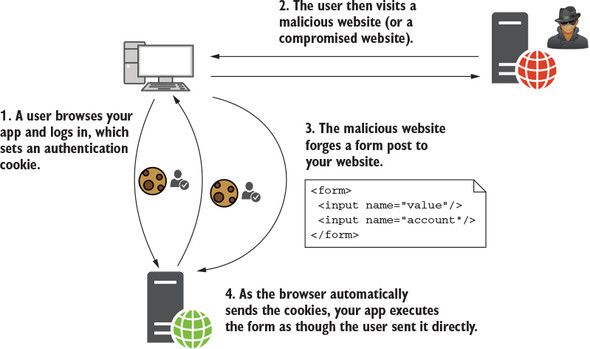
The vulnerability here revolves around the fact that browsers automatically send cookies when a page is requested (using a GET request) or a form is POSTed. There’s no difference between a legitimate POST of the form in your banking app and the attacker’s malicious POST. Unfortunately, this behavior is baked into the web; it’s what allows you to navigate websites seamlessly after initially logging in.
A common solution to the attack is the synchronizer token pattern,[8] which uses user-specific, unique, anti-forgery tokens to enforce a difference between a legitimate POST and a forged POST from an attacker. One token is stored in a cookie and another is added to the form you wish to protect. Your app generates the tokens at runtime based on the current logged-in user, so there’s no way for an attacker to create one for their forged form.
Cross-site request forgery (CSRF) attacks are a problem for apps that use cookie-based authentication, such as ASP.NET Core Identity. It relies on the fact browsers automatically send cookies to a website. A malicious website could create a form that POSTs to your API, and the browser will send the authentication cookie with the request. This allows malicious websites to send requests as though they’re the logged-in user. You can mitigate CSRF attacks using anti-forgery tokens. These involve writing a hidden field in every form that contains a random string based on the current user. A similar token is stored in a cookie. A legitimate request will have both parts, but a forged request from a malicious website will only have the cookie half; they cannot create the hidden field in the form. By validating these tokens, your API can reject forged requests.