concept default in category asp.net

This is an excerpt from Manning's book ASP.NET Core in Action, Second Edition.
Highly extensible configuration system
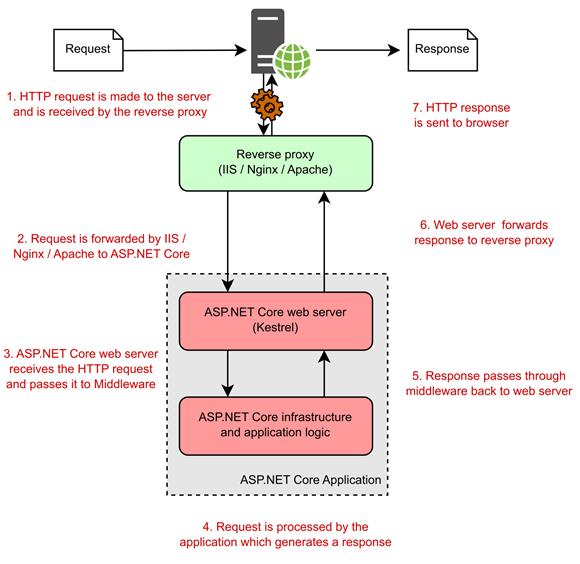
Figure 1.8 How an ASP.NET Core application processes a request. A request is received from a browser at the reverse proxy, which passes the request to the ASP.NET Core application, which runs a self-hosted web server. The web server processes the request and passes it to the body of the application, which generates a response and returns it to the web server. The web server relays this to the reverse proxy, which sends the response to the browser.
By default, ASP.NET Core uses three different binding sources when creating your binding models. It looks through each of these in order and takes the first value it finds (if any) that matches the name of the binding model:

This is an excerpt from Manning's book ASP.NET Core in Action.
In this book, when I say “web server” in the context of ASP.NET Core, I am referring to the HTTP server that runs as part of your ASP.NET Core application. By default, this is the Kestrel web server, but that’s not a requirement. It would be possible to write a replacement web server and substitute if for Kestrel if you desired.
Listing 2.2. The default Program.cs configures and runs an IWebHost
public class Program { public static void Main(string[] args) { BuildWebHost(args) #1 .Run(); #2 } public static IWebHost BuildWebHost(string[] args) => WebHost.CreateDefaultBuilder(args) #3 .UseStartup<Startup>() #4 .Build(); #5 } #1 Create an IWebHost using the BuildWebHost method. #2 Run the IWebHost, start listening for requests and generating responses. #3 Create a WebHostBuilder using the default configuration. #4 The Startup class defines most of your application’s configuration. #5 Build and return an instance of IWebHost from the WebHostBuilder. !@%STYLE%@! {"css":"{\"css\": \"font-weight: bold;\"}","target":"[[{\"line\":4,\"ch\":63},{\"line\":4,\"ch\":65}],[{\"line\":14,\"ch\":0},{\"line\":14,\"ch\":2}],[{\"line\":5,\"ch\":63},{\"line\":5,\"ch\":65}],[{\"line\":15,\"ch\":0},{\"line\":15,\"ch\":2}],[{\"line\":9,\"ch\":63},{\"line\":9,\"ch\":65}],[{\"line\":16,\"ch\":0},{\"line\":16,\"ch\":2}],[{\"line\":10,\"ch\":63},{\"line\":10,\"ch\":65}],[{\"line\":17,\"ch\":0},{\"line\":17,\"ch\":2}],[{\"line\":11,\"ch\":63},{\"line\":11,\"ch\":65}],[{\"line\":18,\"ch\":0},{\"line\":18,\"ch\":2}]]"} !@%STYLE%@!
The console logger is added by default in the CreateDefaultBuilder method, as you’ll see in section 17.3.
In this section, we’ll replace the default ILoggerFactory in the Recipe app with an implementation that uses Serilog. Serilog (https://serilog.net) is an open source project that can write logs to many different locations, such as files, the console, an Elasticsearch cluster,[2] or a database.

This is an excerpt from Manning's book ASP.NET 4.0 in Practice.
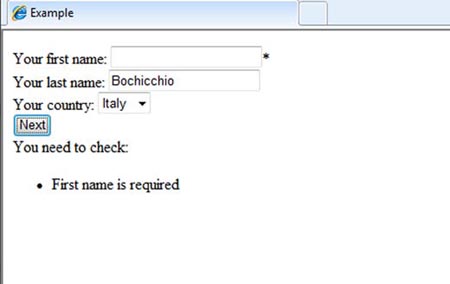
A personalized error page is way more professional than a default one, and it’ll help you to protect sensitive data. Even though it’s useful to know as much as you can about your environment while you’re developing or debugging, an attacker can use this information to bypass your security check, to inspect your code, or, at worst, to arbitrarily execute some hidden functions.
As with previous threats, the problem is in how string concatenations are performed. A web server is protected by default from this attack (also known as directory traversal vulnerability). If you have your code inside a physical directory named c:\inetpub\ mysite\ and you’re requesting something like http://localhost/../../somefile.txt, the corresponding physical request won’t be processed. The problem isn’t in how the web server is processing these requests, but in how you dynamically compose a path. The path canonicalization issue surfaces in these scenarios.