concept handler in category asp.net

This is an excerpt from Manning's book ASP.NET Core in Action, Second Edition.
The
PrivacyModelcontains a single handler,OnGet, which indicates it should run in response toGETrequests for the page. As the method returnsvoid, executing the handler will execute the associated Razor template for the page, to generate the HTML.
The handler doesn’t interact with the database directly. Instead, it uses the categoryvalue provided to interact with theToDoService, which is injected as a constructor argument using dependency injection.The handler returns Page()at the end of the method to indicate the associated Razor view should be rendered. The return statement is actually optional in this case; by convention, if the page handler is avoidmethod, the Razor view will still be rendered, behaving as if you had calledreturn Page()at the end of the method.The Razor View has access to the CategoryModelinstance, so it can access theItemsproperty that is set by the handler. It uses these items to build the HTML that is ultimately sent to the user.

This is an excerpt from Manning's book ASP.NET Core in Action.
Which brings us to the final and most substantial piece of middleware in the pipeline: the MVC middleware. It’s responsible for interpreting the request to determine which method to invoke, for reading parameters from the request, and for generating the final HTML. Despite that, the only configuration required, aside from adding the middleware to the pipeline, is to define a route that will be used to map requests to a handler. For each request, the MVC middleware uses this route to determine the appropriate controller and action method on the controller to invoke, and hence, which HTML to generate.
You’ll use policies extensively in the ASP.NET Core authorization system, so in section 15.4, we explore how to handle more complex scenarios. You’ll learn about authorization requirements and handlers, and how you can combine them to create specific policies that you can apply to your MVC actions.
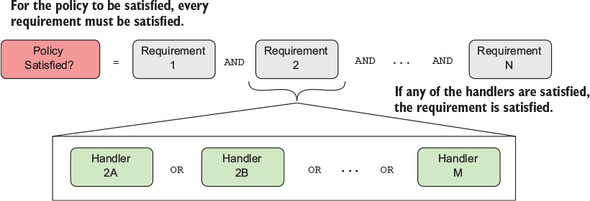
You can use requirements and handlers to achieve most any combination of behavior you need for a policy. By combining handlers for a requirement, you can validate conditions using a logical OR: if any of the handlers are satisfied, the requirement is satisfied. By combining requirements, you create a logical AND: all of the requirements must be satisfied for the policy to be satisfied, as shown in figure 15.5.
Handlers should implement AuthorizationHandler<T>, where T is the type of requirement they handle. For example, the following listing shows a handler for AllowedInLoungeRequirement that checks whether the user has a claim called FrequentFlyerClass with a value of Gold.
You can handle this scenario by using the context.Fail() method exposed on the context, as shown in the following listing. Calling Fail() in a handler will always cause the requirement, and hence the whole policy, to fail. You should only use it when you want to guarantee failure, even if other handlers indicate success.
Listing 15.10. Calling context.Fail() in a handler to fail the requirement
public class BannedFromLoungeHandler : AuthorizationHandler<AllowedInLoungeRequirement> #1 { protected override Task HandleRequirementAsync( #2 AuthorizationHandlerContext context, #2 AllowedInLoungeRequirement requirement) #2 { if(context.User.HasClaim(c => c.Type == "IsBanned")) #3 { context.Fail(); #4 } return Task.CompletedTask; #5 } } #1 The handler implements AuthorizationHandler<T>. #2 You must override the abstract HandleRequirementAsync method. #3 Checks whether the user has the IsBanned claim #4 If the user has the claim, then fail the requirement by calling Fail. The whole policy will fail. #5 If the claim wasn’t found, do nothing. !@%STYLE%@! {"css":"{\"css\": \"font-weight: bold;\"}","target":"[[{\"line\":1,\"ch\":68},{\"line\":1,\"ch\":70}],[{\"line\":16,\"ch\":0},{\"line\":16,\"ch\":2}],[{\"line\":3,\"ch\":68},{\"line\":3,\"ch\":70}],[{\"line\":4,\"ch\":68},{\"line\":4,\"ch\":70}],[{\"line\":5,\"ch\":68},{\"line\":5,\"ch\":70}],[{\"line\":17,\"ch\":0},{\"line\":17,\"ch\":2}],[{\"line\":3,\"ch\":68},{\"line\":3,\"ch\":70}],[{\"line\":4,\"ch\":68},{\"line\":4,\"ch\":70}],[{\"line\":5,\"ch\":68},{\"line\":5,\"ch\":70}],[{\"line\":17,\"ch\":0},{\"line\":17,\"ch\":2}],[{\"line\":3,\"ch\":68},{\"line\":3,\"ch\":70}],[{\"line\":4,\"ch\":68},{\"line\":4,\"ch\":70}],[{\"line\":5,\"ch\":68},{\"line\":5,\"ch\":70}],[{\"line\":17,\"ch\":0},{\"line\":17,\"ch\":2}],[{\"line\":7,\"ch\":68},{\"line\":7,\"ch\":70}],[{\"line\":18,\"ch\":0},{\"line\":18,\"ch\":2}],[{\"line\":9,\"ch\":68},{\"line\":9,\"ch\":70}],[{\"line\":19,\"ch\":0},{\"line\":19,\"ch\":2}],[{\"line\":12,\"ch\":68},{\"line\":12,\"ch\":70}],[{\"line\":20,\"ch\":0},{\"line\":20,\"ch\":2}]]"} !@%STYLE%@!