concept HTML in category asp.net
This is an excerpt from Manning's book ASP.NET MVC in Action with MvcContrib, NHibernate, and More.
Depending on how long you’ve been building web applications on the Microsoft platform, you’ll relate to some or all of the following pain. In the 1990s, developers built interactive websites using executable programs that ran on a server. These programs (Common Gateway Interface [CGI] was a common technology at the time) accepted a web request and were responsible for creating an HTML response. Templating was ad hoc, and the programs were difficult to write, debug, and test. In the late 1990s, Microsoft, after a brief stint with HTX templates and IDC connectors, introduced Active Server Pages, or ASP. ASP brought templating to web applications. The server page was an HTML document with dynamic script mixed in. Although this was a big step forward from the alternatives, the world soon saw massive server pages with code indecipherable from the markup.
In early 2002, along came ASP.NET and the Web Forms Framework. Web Forms were a complete shift for ASP developers, partly because they moved most program logic into a class file (called a code-behind) and replaced the HTML markup with dynamic server controls written in an XML syntax. Although performance increased, and the debugging experience improved, new problems arose.
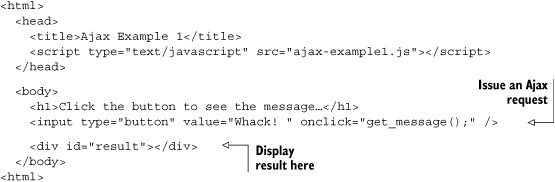
An example is the best way to describe how AJAX works. We’ll create a simple HTML page that has a button on it. When the button is clicked, an AJAX request will be sent to the server. The response will be a simple message, which we’ll display to the user. No browser refresh will occur. Take a look at our HTML page in listing 9.1
This is a basic HTML page with a button on it. When the user clicks the button, the server should get the message without refreshing the page, and display it to the user. Listing 9.2 shows the contents of the referenced JavaScript:
When you submit the form, the session is added, and the user is redirected back to /session/index to view the updated table. The HTML behind this form looks like this:
<% using(Html.BeginForm("add", "session",
         FormMethod.Post, new{id="new_session"})) { %>
<fieldset>
    <legend>Propose new session</legend>
    <label for="title">Title</label>
    <input type="text" name="title" />

    <label for="description">Description</label>
    <textarea name="description" rows="3" cols="30"></textarea>

    <label for="level">Level</label>
    <select name="level">
        <option selected="selected" value="100">100</option>
        <option value="200">200</option>
        <option value="300">300</option>
        <option value="400">400</option>
    </select>

    <input type="submit" value="Add" />
</fieldset>
<% } %>
It’s important to ensure that your application works without AJAX, because your users might decide to run with JavaScript turned off, or they might be using a mobile browser without JavaScript support. Our example works, so we can now focus on spot-welding AJAX onto this form without touching the HTML. We can apply a simple jQuery script that will hijack this form post and provide the seamless AJAX experience instead (when the user has enabled JavaScript). This is called progressive enhancement.
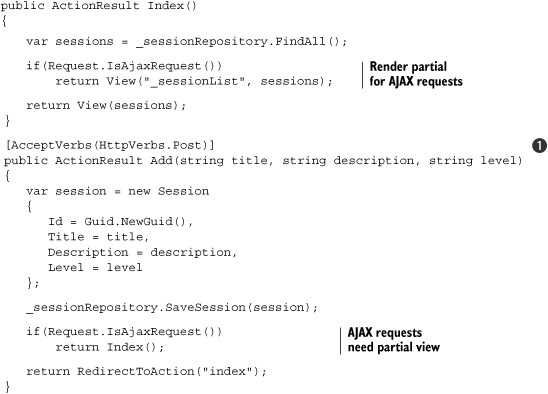
Listing 9.5 shows the SessionController actions in detail. Notice how we are reusing the same actions for both full layout and partial HTML requests. This is implemented as a partial view _list.ascx. This user control is embedded in the full layout, and rendered independently for partial requests.
The Index action checks to see whether the request is an AJAX request. If so, it will render the user control that represents the HTML fragment being displayed. If it’s a regular request, the full HTML document (with the template) will be rendered.
The Add action is decorated with an AcceptVerbs attribute
to protect it from GET requests. If this is an AJAX request—which is defined by an extra HTTP header in the request—the response needs to be the updated session list HTML. In the standard case without AJAX, the browser should redirect to the Index action.