concept incoming request in category asp.net

This is an excerpt from Manning's book ASP.NET Core in Action, Second Edition.
Figure 2.1 An overview of an ASP.NET Core application. The ASP.NET Core application contains of a number of blocks that process an incoming request from the browser. Every request passes to the middleware pipeline. It potentially modifies it, then passes it to the endpoint middleware at the end of the pipeline to generate a response. The response passes back through the middleware, to the server, and finally, out to the browser.
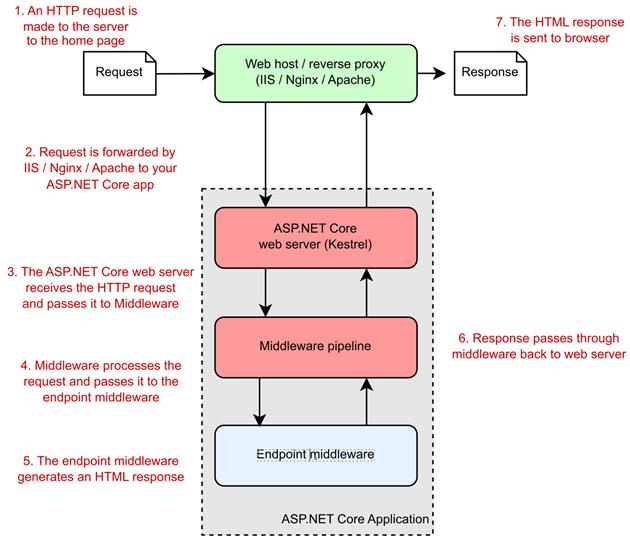
In chapter 3, you learned about the middleware pipeline, which defines how an ASP.NET Core application responds to a request. Each piece of middleware can modify or handle an incoming request, before passing the request to the next middleware in the pipeline.

This is an excerpt from Manning's book ASP.NET Core in Action.
Figure 2.1. An overview of an ASP.NET Core application. The ASP.NET Core application contains a number of blocks that process an incoming request from the browser. Every request passes to the middleware pipeline. It potentially modifies it, then passes it to the MVC middleware at the end of the pipeline to generate a response. The response passes back through the middleware, to the server, and finally, out to the browser.

The MVC middleware is a particularly large component and is commonly where you’ll spend most of your time during development. It serves as the entry point for most of your app’s business logic, as it routes incoming requests to action methods, which call methods on your app’s various business services and models.
You can create branches in the middleware pipeline with the Map extension. If an incoming request matches the specified path prefix, the request will execute the pipeline branch, otherwise it will execute the trunk.

This is an excerpt from Manning's book ASP.NET 4.0 in Practice.
Now that you can filter incoming requests, you’re ready to build a blocking engine to handle and improve parameter values. To avoid problems, it’s crucial to monitor bad requests. HTTP has its own request statuses. By using them, we’re telling the browser (or, generally speaking, the client) that the request had some trouble and didn’t execute correctly.